Some links on this page may be affiliate links. They never change a rating. Details
The best AI visual testing tool for most QA teams is Applitools Eyes if budget allows (its Visual AI ignores rendering noise that breaks pixel tools), and Percy if you want a free plan (5,000 screenshots a month). For Storybook component libraries pick Chromatic. If you need $0 and can tune thresholds yourself, Playwright’s built-in screenshot comparison or BackstopJS work well.
Updated 9 November 2026. Prices were checked on each vendor’s own pricing page on that date. Licenses were checked on GitHub. The free tools were tested by us on 9 November 2026 (see “What We Tested”).
AI Visual Testing vs Pixel Comparison: What Is the Difference?
Visual testing takes a screenshot of your page and compares it with an approved “baseline” image. The difference between tools is how they compare:
- Pixel comparison (Playwright, BackstopJS, reg-suit) flags any pixel that changed beyond a threshold. It is free and precise, but font smoothing, anti-aliasing or a different OS can trigger false failures.
- AI visual comparison (Applitools, and Percy’s paid-plan Visual Review Agent) tries to judge changes the way a person would: it ignores tiny rendering noise and groups similar changes, so reviewers see fewer false positives.
Rule of thumb: if your team spends more time approving noise than finding real bugs, an AI tool pays for itself. If you have a small, stable UI and one CI environment, pixel comparison is enough.
AI Visual Testing Tools Compared (2026)
| Tool | Comparison type | Free option | Paid from | Best for |
|---|---|---|---|---|
| Applitools Eyes | Visual AI | Free trial only | $667/month (Starter, billed annually) | Large apps, many browsers, fewest false positives |
| Percy (BrowserStack) | Pixel diffs on the free plan; AI review on paid plans | Free plan: 5,000 screenshots/month | $199/month (Desktop, billed annually) | Teams already on BrowserStack |
| Chromatic | Pixel (snapshot) | Free plan: 5,000 snapshots/month, Chrome only | $179/month (Starter) | Storybook and component libraries |
| Playwright screenshots | Pixel (pixelmatch) | Free, Apache-2.0 | — | Teams already writing Playwright tests |
| BackstopJS | Pixel | Free, MIT | — | Config-driven checks of many URLs |
| reg-suit | Pixel | Free, MIT | — | Comparing screenshots from any tool in CI |
1. Applitools Eyes: Best AI Visual Testing Tool Overall
Applitools is the tool that made “Visual AI” a category. Instead of counting changed pixels, it compares layout and content the way a human reviewer would, so a one-pixel font shift does not fail your build. Its Ultrafast Grid renders one test across many browsers and screen sizes in the cloud, and it has SDKs for Selenium, Playwright, Cypress and more.
- Pricing: no permanent free plan, free trial only. Starter is $667/month billed annually (unlimited users); Professional and Enterprise are custom quotes.
- Pros: the fewest false positives of any tool here; broad framework support; strong cross-browser grid.
- Cons: the most expensive option; overkill for a small site.
Full details in our Applitools review.
2. Percy: Best AI Visual Testing Tool with a Free Plan
Percy is BrowserStack’s visual testing product. You add a snapshot call to your existing tests, Percy renders the page in its cloud browsers and shows a side-by-side diff for review. BrowserStack’s AI “Visual Review Agent” summarizes changes and cuts review noise, but according to Percy’s docs it is available only on paid plans. Read our full Percy review for pricing details and what we saw in the dashboard.
- Pricing: Free plan with 5,000 screenshots/month, unlimited users and 30 days of build history. Desktop $199/month (10,000 screenshots), Desktop & Mobile $599/month (25,000 screenshots), both billed annually. Enterprise is custom.
- Pros: generous free plan; easy setup with Selenium, Playwright, Cypress and Storybook; one bill if you already use BrowserStack.
- Cons: the AI review is paid-only, so the free plan relies on standard visual diffs; extra screenshots are billed per shot.
See how it stacks up in Applitools vs Percy and our BrowserStack review.
3. Chromatic: Best for Storybook Component Libraries
Chromatic is made by the team behind Storybook. It snapshots every story in your component library and flags visual changes on each pull request. It does not market itself as AI; its strength is a smooth review workflow for design systems. Its CLI is open source (MIT).
- Pricing: Free plan with 5,000 snapshots/month on Chrome, unlimited projects and users. Starter $179/month (35,000 snapshots, adds Safari, Firefox and Edge), Pro $399/month (85,000 snapshots). Enterprise is custom.
- Pros: best Storybook integration; no credit card for the free plan.
- Cons: built around components, less suited to full end-to-end page testing.
4. Playwright Screenshots: Best Free Option for Playwright Users
If you already write Playwright tests, you have visual testing built in. await expect(page).toHaveScreenshot() saves a baseline on the first run and compares on every run after. It uses the pixelmatch library, and you control strictness with threshold and maxDiffPixels. Run npx playwright test --update-snapshots to accept intended changes.
- Pricing: free and open source (Apache-2.0).
- Pros: zero extra tools; works in any CI.
- Cons: no AI and no review dashboard; baselines differ per browser and OS, so run tests in one consistent environment (for example a Docker image) to avoid false failures.
New to Playwright? Start with Selenium vs Playwright or Cypress vs Playwright.
5. BackstopJS: Best Free Tool for Checking Many Pages
BackstopJS is a long-running open-source project (MIT) that you drive with a config file: list your URLs, selectors and viewports, and it captures and compares them in a headless browser, then opens an HTML report with the diffs. You do not need to write test code, which makes it handy for marketing sites and CMS pages.
- Pricing: free (MIT).
- Pros: no test code; clear HTML report; easy to run before and after a deployment.
- Cons: pixel-based, so expect some tuning; you host and store everything yourself.
6. reg-suit: Best Free Tool for Visual Diffs in CI
reg-suit (MIT) does not take screenshots itself. It compares screenshots produced by any tool, stores baselines in cloud storage such as S3 or Google Cloud Storage through plugins, and posts a report to your pull request. Use it when you already capture screenshots and want a review step without a paid service.
Best AI Visual Testing Tools for Selenium Users
If you have a large Selenium suite, you do not need to rewrite it to add visual checks. Applitools and Percy both offer Selenium SDKs: you add one visual check call to existing tests. If you are migrating from Selenium to Playwright anyway, you get free pixel comparison built in and can add Applitools or Percy later when false positives become a problem.
What We Tested: Playwright, BackstopJS and reg-cli on a Demo Page
We ran the free tools ourselves on 9 November 2026. We built a small demo page (a header, a button, three price cards), took a baseline, then changed three things: the button colour, the Team price ($49 to $59) and the spacing between nav links. The goal was to see whether each tool catches real changes and how much setup it needs. This was a small test on one Chromium browser on Linux, so treat it as a first look, not a benchmark.
| Tool (version) | Result on the changed page | What we noticed |
|---|---|---|
| Playwright Test 1.63 | Failed: 4,610 pixels different (about 1% of the image) | Baseline created in under 2 seconds. The same page passed on re-run. The diff image highlights the button, the price and the nav links. |
| BackstopJS 6.3.25 | Failed: 1.08% mismatch (threshold set to 0.1%) | Needed one fix: its bundled Playwright expected a different Chromium than the one installed, so we pinned the Playwright version. Reference and test runs each took about a second. |
| reg-cli (the comparison engine behind reg-suit) | Flagged 1 changed image | Compares two folders of images and writes a report. We did not test reg-suit’s cloud storage plugins. |
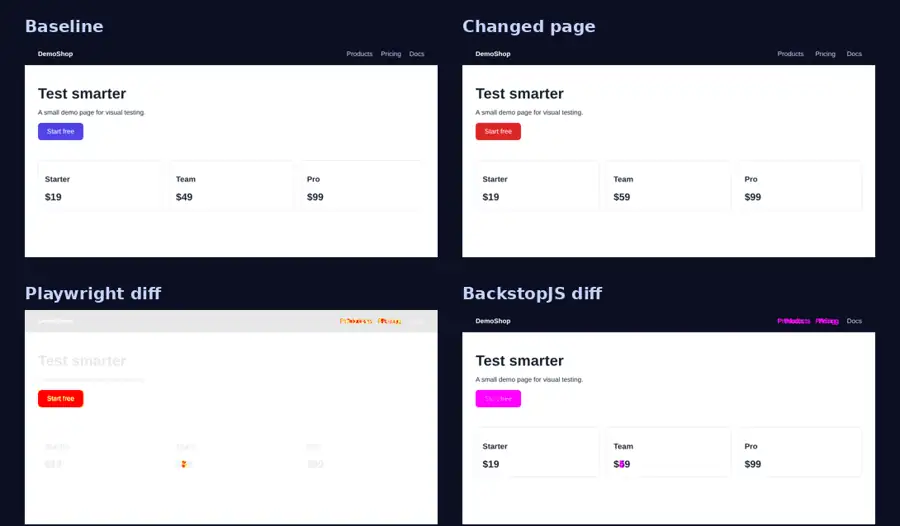
Two takeaways. First, all three tools flagged the same three changes, so for a stable page pixel comparison works. Second, a loose threshold hides real bugs: when we set Playwright’s maxDiffPixelRatio to 0.05 (5%), the same page with the changed button colour and price passed. Keep thresholds tight and fix the cause of noise instead of widening them.
What we did not test: Applitools, Percy and Chromatic (they are cloud services, so their details above come from each vendor’s own pricing and documentation pages), cross-browser or cross-OS noise, and large real-world sites.
Which Visual Testing Tool Should You Choose?
- Enterprise app, many browsers, budget available: Applitools.
- Want to start free and add AI review later: Percy.
- Design system in Storybook: Chromatic.
- Already on Playwright, $0 budget: Playwright
toHaveScreenshot(). - Marketing site or CMS, no test code: BackstopJS.
For the wider picture beyond visual testing, see our 10 best AI testing tools and free AI testing tools.
Frequently Asked Questions
What is the best AI visual testing tool?
Applitools Eyes is the most capable AI visual testing tool because its Visual AI produces the fewest false positives. Percy is a good choice if you want to start on a free plan, with AI review available on its paid plans.
Is there a free AI visual testing tool?
Not really. Percy has a free plan with 5,000 screenshots a month, but its AI Visual Review Agent is available only on paid plans. Chromatic has a free plan with 5,000 snapshots a month on Chrome, but it is not marketed as AI. Applitools offers its Visual AI only through a free trial. Fully free open-source options (Playwright, BackstopJS, reg-suit) use pixel comparison rather than AI.
Is Applitools better than Percy?
Applitools is built around Visual AI and a cross-browser grid; Percy is cheaper, has a free plan (without its AI review), and fits teams already using BrowserStack. Read the full Applitools vs Percy comparison.
Can Playwright do visual testing?
Yes. Playwright’s toHaveScreenshot() assertion compares screenshots with a saved baseline using pixelmatch. It is free but has no AI, so run it in a consistent environment to avoid false failures.
How do I reduce false positives in visual testing?
Run tests in one fixed environment (same OS, browser version and fonts), hide dynamic content such as dates and ads, wait for animations to finish, and set a small difference threshold. If noise still costs your team hours, switch to an AI tool such as Applitools or Percy.
Sources: vendor pricing pages (applitools.com/pricing, browserstack.com/pricing?product=percy, chromatic.com/pricing), Playwright docs (playwright.dev/docs/test-snapshots) and GitHub repositories for licenses, all checked 9 November 2026.

QA automation engineer. Each guide says what I ran myself and what I only researched, and I update it when things change. About me
One useful email a week
New guides, tool price changes and AI testing news. No spam.