The Cypress vs Playwright debate has a winner for most teams in 2026 — but the answer depends on what you are testing and where your career is headed, not on the feature checklist every other article repeats. Both are modern JavaScript end-to-end testing frameworks, and both are excellent.
This Cypress vs Playwright comparison is written from an SDET perspective. It covers the real architectural difference, the speed truth most articles get wrong, AI testing support, and the one question that matters most to your salary — which framework gets you hired in 2026.
Cypress vs Playwright — which is better?
Playwright is the better choice for most teams in 2026, especially for cross-browser testing, multi-tab and cross-origin scenarios, and testing AI applications. It supports more languages (JavaScript, TypeScript, Python, Java, C#) and runs faster on complex suites. Cypress remains excellent for JavaScript-only teams testing single-domain React or Vue apps, where its in-browser execution and Time Travel debugging give a superior developer experience. For career growth, Playwright appears in more job postings.
Table of Contents
Cypress vs Playwright — The Architectural Difference That Explains Everything
The core difference between Cypress and Playwright is architecture: Cypress runs inside the browser’s event loop, while Playwright controls the browser from an outside process over WebSocket. Every other difference flows from this one fact.
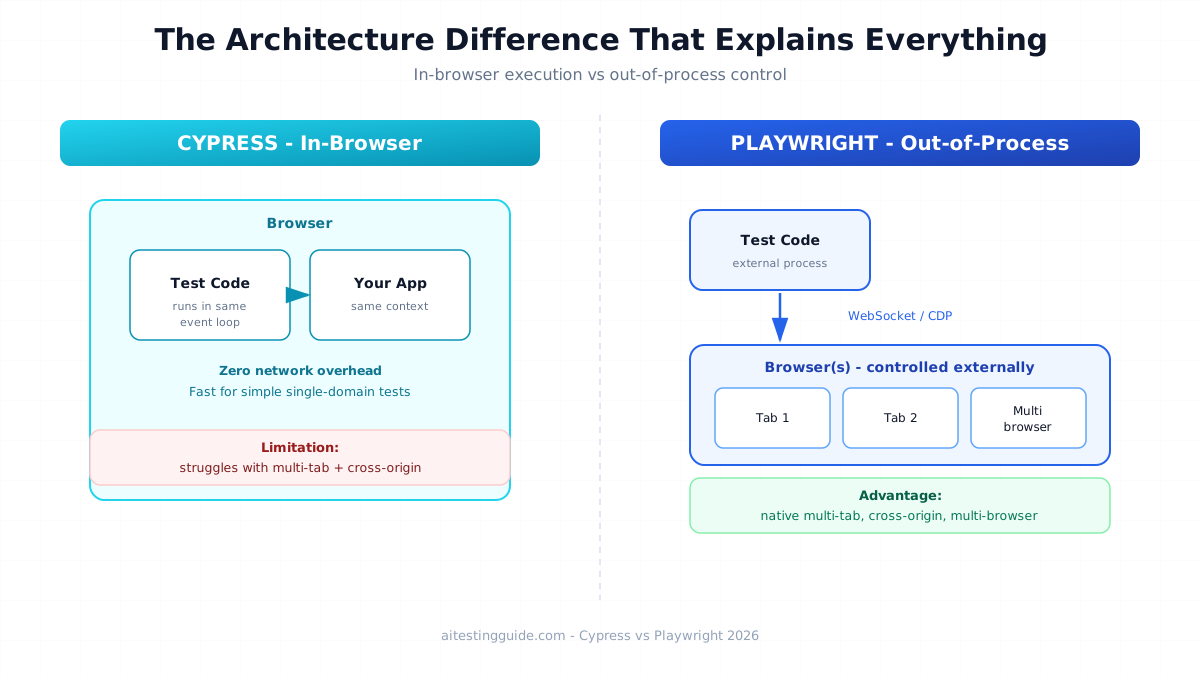
- Cypress (in-browser): runs in the same run loop as your app. This gives tight DOM access and zero network overhead for simple interactions, but limits multi-tab and cross-origin testing
- Playwright (out-of-process): drives the browser via the Chrome DevTools Protocol from outside. This enables multi-tab, multi-domain, and multi-browser control natively
This is why Cypress struggles with iframes and cross-origin authentication while Playwright handles them natively. Understanding this architecture is what separates an SDET answer from a junior one. For how this compares to the older standard, see our Selenium vs Playwright comparison.
Cypress vs Playwright Speed — Busting the “Playwright Is Always Faster” Myth
Playwright is faster than Cypress on complex test suites, but the claim that Playwright is always faster is a myth. For simple single-domain DOM interactions, Cypress’s in-browser execution can actually be faster because there is zero network overhead.
Here is the honest breakdown most articles skip. Cypress runs commands inside the browser loop, so a simple click-and-assert on one page has no round-trip cost. Playwright sends each command over WebSocket from an external process, which adds tiny per-command overhead.
Playwright pulls ahead — and stays ahead — when tests get complex: multiple tabs, parallel execution, cross-browser runs, and large suites. Empirical 2026 studies on React SPAs show Playwright completing suites faster overall and using less RAM than Cypress, particularly in heavy Angular and React applications.
The practical takeaway: for a small single-domain app, the speed difference is negligible. For an enterprise suite running in CI/CD, Playwright’s parallelization wins clearly.
Cypress vs Playwright — Language and Browser Support
Playwright supports more languages and browsers than Cypress, which matters for multi-language teams. Cypress is JavaScript and TypeScript only, while Playwright adds Python, Java, and C#.
- Cypress languages: JavaScript, TypeScript
- Playwright languages: JavaScript, TypeScript, Python, Java, C#
- Cypress browsers: Chromium, Firefox, Edge, experimental WebKit
- Playwright browsers: Chromium, Firefox, and full WebKit (real Safari engine)
If your team uses Java or Python for backend testing, Playwright lets you keep one language across the stack. This is a real advantage for SDETs working in mixed-language enterprises. See our best Selenium frameworks guide for Java-based context.
Cypress vs Playwright Debugging — Time Travel vs Trace Viewer
Cypress wins on live debugging experience with its Time Travel feature, while Playwright wins on post-run analysis with its Trace Viewer. This is one area where Cypress’s in-browser architecture gives a genuinely better developer experience.
- Cypress Time Travel — hover over each command to see DOM snapshots at that exact moment, live in the browser. Excellent for interactive debugging
- Playwright Trace Viewer — captures a full trace with screenshots, network logs, and DOM snapshots you open after the run. Excellent for debugging CI failures
For local development, many engineers prefer Cypress’s instant feedback. For diagnosing why a test failed in a CI pipeline at 2 AM, Playwright’s Trace Viewer is more powerful.
Cypress vs Playwright for AI and Agentic Testing
Playwright is significantly better positioned for AI and agentic testing in 2026, thanks to its multi-tab support and Model Context Protocol integration. This is the gap almost every comparison article ignores, and it matters most for the future of testing.
Both frameworks added AI features. Cypress 15 introduced a beta cy.prompt, and Playwright shipped AI agents for test planning, generation, and healing. But the deeper story is architecture again. Testing complex LLM agent workflows and RAG outputs often requires controlling multiple tabs, intercepting network calls, and handling non-deterministic flows — areas where Playwright’s out-of-process model is far stronger than Cypress’s in-browser proxy.
If your career is heading toward AI testing — and it should be — Playwright is the safer bet. It integrates more cleanly with the AI testing stack. See our AI test engineer roadmap and agentic testing guide for where this leads.
Cypress vs Playwright — Full Comparison Table
Here is the complete Cypress vs Playwright comparison across the factors SDETs actually weigh when choosing a framework.
| Factor | Cypress | Playwright |
|---|---|---|
| Architecture | In-browser event loop | Out-of-process (WebSocket/CDP) |
| Languages | JS, TS | JS, TS, Python, Java, C# |
| Browsers | Chromium, Firefox, Edge | Chromium, Firefox, full WebKit |
| Multi-tab | Limited | Native |
| Cross-origin | Workarounds needed | Native |
| Speed (complex suites) | Good | Faster |
| Debugging | Time Travel (live) | Trace Viewer (post-run) |
| Parallelization | Paid Cypress Cloud | Free native sharding |
| AI testing fit | cy.prompt (beta) | AI agents + MCP |
Feature sets change — always check the official documentation for the latest capabilities.
Cypress vs Playwright vs Selenium — Where Each Fits
In the Cypress vs Playwright vs Selenium picture, Selenium remains the enterprise standard for legacy and multi-language teams, Playwright is the modern all-rounder, and Cypress is the JavaScript developer favourite. Each has a clear lane.
- Selenium — widest language support, huge ecosystem, most enterprise job postings, but more flaky and verbose
- Playwright — modern architecture, fast, multi-browser, best for AI testing and new projects
- Cypress — best developer experience for JS-only teams on single-domain SPAs
For the full Selenium comparison, see our Cypress vs Selenium guide. Together with this article and our Selenium vs Playwright comparison, you now have all three pairings covered.
Which Should You Learn First for Your Career?
For career growth in 2026, learn Playwright first. It appears in more job postings, supports more languages, and aligns better with the move toward AI testing — though Cypress remains valuable if you work in a JavaScript-only frontend team.
The honest career advice: Playwright is the higher-leverage skill for most SDETs right now. Its language flexibility means you are not locked into JavaScript, and its architecture future-proofs you for AI and agentic testing work. Learn Playwright as your primary modern framework, understand Cypress enough to discuss the trade-offs in interviews, and keep Selenium knowledge for enterprise roles.
To build the foundational automation skills that make either framework click, this Selenium WebDriver with Python course on Udemy covers the patterns that transfer across all three tools. For the full career path, see our how to become an SDET guide.
Disclosure: This article contains affiliate links. If you purchase through these links I earn a small commission at no extra cost to you.
Final Thoughts
The Cypress vs Playwright decision comes down to context, not a single winner. Playwright wins for most teams in 2026 — more languages, better cross-browser and multi-tab support, free parallelisation, and a clear edge for AI testing. Cypress wins for JavaScript-only teams who value its Time Travel debugging and tight in-browser developer experience on single-domain apps.
Ignore the “Playwright is always faster” myth and the endless feature checklists. Understand the architecture — in-browser versus out-of-process — and the right choice for any given project becomes obvious. For your career, bet on Playwright while keeping Cypress and Selenium in your toolkit.
Frequently Asked Questions
What are the biggest differences between Cypress and Playwright in 2026?
The biggest differences are architecture and scope. Cypress runs in-browser and supports JavaScript and TypeScript only, with limited multi-tab and cross-origin support. Playwright runs out-of-process, supports five languages, handles multi-tab and cross-browser natively, offers free parallelisation, and integrates better with AI testing. Cypress counters with superior live Time Travel debugging.
Which is better for modern web app testing: Cypress or Playwright?
Playwright is better for most modern web app testing because of its cross-browser support, multi-tab handling, and faster execution on complex suites. Cypress is better for JavaScript-only teams testing single-domain React or Vue SPAs, where its in-browser execution and Time Travel debugging deliver a smoother developer experience.
Is Playwright faster than Cypress for large automation suites?
Yes, Playwright is faster than Cypress for large automation suites, mainly due to free native parallelisation and sharding. Empirical 2026 studies show Playwright completing test suites faster and using less RAM on complex React and Angular apps. However, for simple single-domain interactions, Cypress’s zero network overhead can match or beat Playwright.
Which framework is easier for beginners in QA automation: Cypress or Playwright?
Cypress is generally easier for beginners because of its all-in-one setup, clear documentation, and live Time Travel debugging that makes test behaviour visible. Playwright has a slightly steeper learning curve, but it is not hard, and its broader capabilities pay off as you advance. Beginners in JS-only teams often start with Cypress.
Does Playwright support more browsers and devices than Cypress in 2026?
Yes, Playwright supports more browsers, including full WebKit, which means real Safari engine testing that Cypress only handles experimentally. Playwright also offers strong mobile emulation. Cypress supports Chromium, Firefox, and Edge well, but has historically lagged on WebKit and Safari coverage.
Which tool is best for CI/CD pipelines and parallel execution in 2026?
Playwright is best for CI/CD and parallel execution because it offers free native sharding and parallelisation built in. Cypress parallelisation typically requires paid Cypress Cloud. For teams scaling large suites in GitHub Actions or similar, Playwright’s free parallelisation is a high cost and speed advantage.
Can Cypress and Playwright handle AI-powered web applications effectively?
Playwright handles AI-powered web applications more effectively due to multi-tab support, network interception, and Model Context Protocol integration, which suit non-deterministic LLM and agent workflows. Both added AI features — Cypress has beta cy.prompt and Playwright has AI agents — but Playwright’s out-of-process architecture is better for testing complex AI applications.
Which automation framework is more stable for flaky test reduction?
Both Cypress and Playwright reduce flakiness with automatic waiting that waits for elements to be actionable rather than just present. Playwright’s auto-wait and web-first assertions are very robust across complex scenarios, while Cypress’s retry-ability is excellent for single-domain apps. Both are far more stable than older Selenium-based suites.
How do Cypress and Playwright compare for API testing and network mocking?
Both support API testing and network mocking, but Playwright offers more powerful network interception because its out-of-process architecture can intercept and modify requests across tabs and origins. Cypress handles network stubbing well for single-domain apps via cy.intercept. For complex cross-origin API mocking, Playwright is more capable.
Which framework should SDETs learn first in 2026 for better career growth?
SDETs should learn Playwright first in 2026 for better career growth. It appears in more job postings, supports five languages, so you are not locked into JavaScript, and aligns with the shift toward AI testing. Learn Playwright as your primary framework, understand Cypress trade-offs for interviews, and keep Selenium for enterprise roles.