Regression testing tools re-run the checks you already trust every time the code changes, so a new release does not quietly break an old feature. Most guides list tools and quote the vendors. On 17 November 2026 we did something different: we wrote the same three regression checks for a small demo shop in Playwright, Selenium and TestCafe, ran each suite 10 times, and then renamed one button to see what broke.
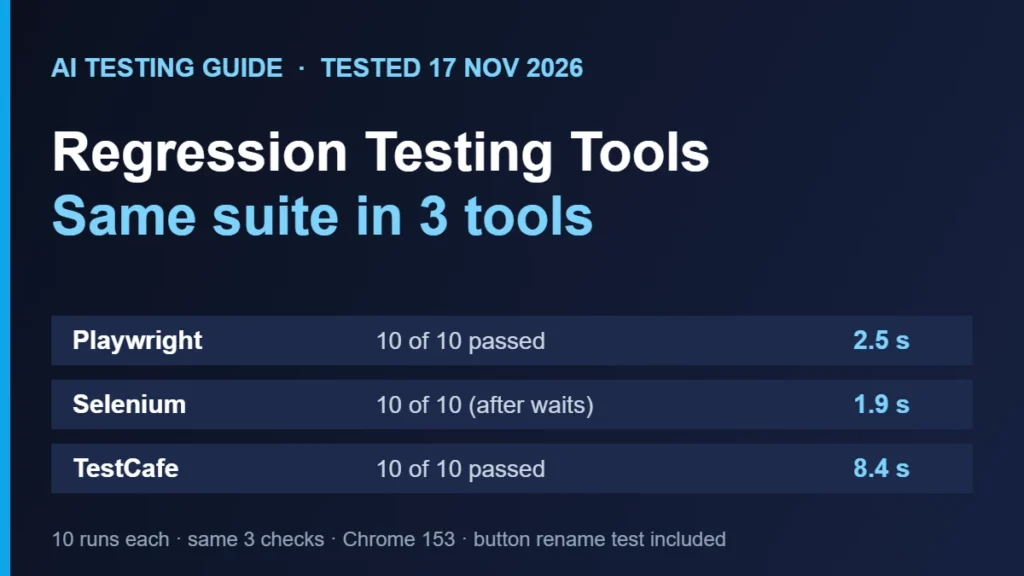
For a new JavaScript or TypeScript suite, pick Playwright. In our run it passed 10 of 10 times in about 2.5 seconds with no waits written by us. Selenium also passed 10 of 10 and was the fastest, but only after we added explicit waits; our first version passed 1 time in 10. TestCafe passed 10 of 10 and needed no waits, but took about 8.4 seconds. None of the three repaired a test after we renamed a button.
What we tested and how
The target was our AITG Demo Shop, a tiny fake store with fixed data that we run on our own computer. It has a product list, a cart, a checkout form and an orders page. We wrote three regression checks and implemented them once per tool:
- Buy a keyboard end to end: open the shop, add the Mechanical keyboard, check the cart total is $49, check out with an email, see “Order #1”.
- Reject an empty-cart order: send a checkout request with no items and expect HTTP 400.
- Order appears on the orders page: buy a USB-C hub, open the orders page, find “#1 – USB-C hub – $29”.
| Item | Version or setting |
|---|---|
| Playwright | @playwright/test 1.65.1 |
| Selenium | selenium-webdriver 4.52.0, ChromeDriver 153.0.8010.52 |
| TestCafe | testcafe 3.7.7 |
| Browser | Chrome 153.0.8010.12, headless, same version for all three |
| Machine | One Linux cloud sandbox, Node 22, run on 17 Nov 2026 |
| Method | The whole suite 10 times per tool, one after another; each run starts the browser from scratch |
Timing includes starting the browser, so it is the time you would wait for a small suite in a script, not a speed benchmark. Run on one machine with three checks, it says nothing about large suites, parallel runs or CI.
Results: pass rate, time and code size
| Tool | Passed (10 runs) | Average time | Test code | Waits we had to write |
|---|---|---|---|---|
| Playwright | 10 of 10 | 2.5 s (2.4 to 2.6) | 25 lines | None |
| Selenium, first version | 1 of 10 | 1.6 s | 41 lines | Only one explicit wait |
| Selenium, after waits for links and form | 5 of 10 | 1.7 s | 42 lines | Waits before each click |
| Selenium, final version | 10 of 10 | 1.9 s | 42 lines | 8 explicit waits |
| TestCafe | 10 of 10 | 8.4 s (8.3 to 8.6) | 25 lines | None |
The Selenium row is the one to read carefully. Our first version failed 9 times in 10 with no such element on the Checkout link, because the browser had not finished loading the next page when the script looked for it. We added waits for the link and the form, and it still failed half the time, because the test jumped to the orders page before the order was saved. Only after we waited for the confirmation did it pass every time. The tool did what it was told; the tests were missing waits. Playwright and TestCafe wait for elements automatically, so the same flows passed on the first try.
// Playwright: no waits needed, it retries until the element is ready
await page.getByRole('button', { name: 'Add to cart' }).click();
await expect(page.getByTestId('total')).toHaveText('Total: $49');

// Selenium: you write the wait yourself
await (await d.wait(until.elementLocated(By.linkText('Checkout')), 5000)).click();
TestCafe was the slowest. Its own report shows about 6 seconds for the three checks, and browser start-up adds the rest of the 8.4 second average. It ran the same checks without a single wait. If your suite is small and you run it often, that overhead adds up. On a larger suite it matters less.
What happens when the page changes
Regression suites spend most of their life being repaired, so we tested that too. We restarted the demo shop with one change: the button that says “Add to cart” now says “Add to basket”. The product still works exactly as before. This is the kind of harmless change that breaks tests in real projects.
| Tool | Tests failed | Time to fail | What the error said |
|---|---|---|---|
| Playwright | The 2 that click the button | 62 s, which matches two tests each hitting the 30 s default timeout | Waiting for getByRole button named “Add to cart” |
| Selenium | The 2 that click the button | 0.8 s | no such element for the XPath of “Add to cart” |
| TestCafe | The 2 that click the button | 27.6 s | The specified selector does not match any element in the DOM tree (it shows the Add to cart line) |
Two lessons. First, none of the three repaired the test, so any claim of self-healing has to come from a different kind of tool, and we have not tested one for this article. Second, how fast a tool fails matters in CI: Selenium told us in under a second, while Playwright made us wait a full minute unless we shorten its timeout. All three named the thing they could not find, which is what you need to fix it quickly.
Which tool should you choose?
- New suite in JavaScript or TypeScript: Playwright. Auto-waiting kept the tests short and stable. See our Cypress vs Playwright test and Selenium vs Playwright comparison.
- You already have Selenium, or need Java, C# or Python bindings your team knows: keep Selenium, and budget time for waits. Our Selenium frameworks guide and Selenium alternatives test cover what to add around it.
- You want no waits and a simple setup, and speed is not critical: TestCafe is a reasonable choice for small suites.
- You need Cypress: see our Cypress vs Selenium comparison. We could not install Cypress in our test environment for this article, so it is not in the numbers above.
Other kinds of regression testing tools
The open-source tools above run your own scripts. Other products add a layer on top. We did not run any of the tools below for this article, so we only point you to our existing pages for each kind.
| Kind | What it adds | Where to read more |
|---|---|---|
| Codeless and AI-assisted | Record or describe tests instead of coding them; some claim self-healing locators | mabl review, Testim review, Katalon review |
| Visual regression | Compare screenshots between releases to catch layout changes | Visual regression testing guide, Applitools alternatives |
| Cross-browser clouds | Run the same suite on many browsers and real devices | BrowserStack review, BrowserStack vs Sauce Labs |
Not sure where to start? Our tool finder and best AI testing tools page narrow the list by what you need.
What we did not test
- Cypress: its installer could not download its program in our sandbox, so it is not included.
- Large suites, parallel runs, CI pipelines and cloud browsers.
- Any commercial tool, including self-healing and AI features.
- Firefox and Safari. All runs used Chrome 153.
Frequently Asked Questions
What is a regression testing tool?
It is software that re-runs saved checks after each code change to confirm that existing features still work. Some tools run scripts you write, such as Playwright or Selenium. Others record tests or compare screenshots.
Which regression testing tool is best for beginners?
In our run Playwright needed the least code and no waits, so it was the easiest to get a stable result. TestCafe was also simple. Selenium works well but you have to add waits yourself.
Is Selenium still worth using for regression tests?
Yes, if your team already uses it or needs its language support. It was the fastest to run in our test. Expect to write explicit waits, or the tests will fail at random.
Can regression tests fix themselves?
Not the three open-source tools we ran. After a button was renamed, all three failed the tests that used it. Some commercial tools say they repair locators automatically, but we have not tested that.
How many times should I run a new test before trusting it?
Run it at least 10 times in a row. The flaky Selenium version in our test passed once in 10 runs, and a single run would have shown either result.
Sources
- Playwright documentation: actionability and auto-waiting
- Selenium documentation: waits
- TestCafe
- Our own test runs, 17 November 2026: three suites, 10 runs each, one machine.

QA automation engineer. Each guide says what I ran myself and what I only researched, and I update it when things change. About me
One useful email a week
New guides, tool price changes and AI testing news. No spam.