People look for Selenium alternatives for the same few reasons: flaky waits, slow setup, and a lot of code for simple flows. To compare the options fairly, we wrote the same two tests (a purchase flow with a button that appears late, and a wrong-password check) in Selenium, Playwright, WebdriverIO and Puppeteer, and ran each one 3 times on 13 November 2026 against the same Chrome. This page shows the code, the results and which tool to pick.
The best Selenium alternative for most teams in 2026 is Playwright: it waits for elements automatically, supports several languages and ships its own test runner. Pick Cypress if your team writes JavaScript and wants an interactive runner, WebdriverIO if you want to stay on the WebDriver standard, Puppeteer for Chrome scripting rather than full test suites, and an AI or low-code tool such as mabl, Testim or Katalon if testers do not write code. Selenium itself is still maintained and free.
Table of Contents
Table of Contents
Why do teams look for Selenium alternatives?
Selenium is still the most widely known browser automation tool, and it is actively maintained: version 4.52.0 of the JavaScript bindings was released on 29 October 2026. The usual complaints are not that it is broken, but that it leaves a lot to you:
- Waiting is manual. If an element appears late, you must add an explicit wait or the test fails. Missing waits are a classic cause of flaky tests.
- It is a library, not a test framework. You add a test runner, reports, retries and screenshots yourself. Our guide to Selenium frameworks covers that setup.
- Drivers must match the browser. Selenium Manager now handles most of this, but in our run the old chromedriver on the machine did not match Chrome, so we pointed Selenium at a matching one.
If those are your pain points, a newer tool can help. If your suite is stable and your team knows Selenium well, switching may cost more than it saves. We compare the two head to head in Selenium vs Playwright and Cypress vs Selenium.
What are the best Selenium alternatives in 2026?
| Tool | Made by / licence | Version checked | Languages | Waits automatically? | Best for |
|---|---|---|---|---|---|
| Playwright | Microsoft, Apache-2.0 | 1.65.0 latest (we ran 1.63.0) | JS/TS, Python, Java, .NET | Yes (we ran it) | Most teams; cross-browser end-to-end tests |
| Cypress | Cypress.io, MIT (app); paid Cloud | 16.3.0 | JS/TS | Yes, built-in retries (per docs) | JavaScript front-end teams who like an interactive runner |
| WebdriverIO | OpenJS Foundation project, MIT | 10.2.0 (we ran it) | JS/TS | Waits for elements to exist (we ran it) | Teams that want the WebDriver standard with a modern JS API |
| Puppeteer | Google Chrome team, Apache-2.0 | 25.17.0 (we ran it) | JS/TS | Locator API yes; older page.click no (we ran both) | Chrome scripting, scraping, PDFs; not a full test runner |
| TestCafe | DevExpress, MIT | 3.7.7 | JS/TS | Yes (per docs) | Simple setup, no WebDriver |
| Nightwatch | BrowserStack, MIT | 3.16.0 | JS/TS | See its docs | Existing Nightwatch users |
| Selenium (baseline) | Selenium project, Apache-2.0 | 4.52.0 (we ran it) | Java, Python, C#, Ruby, JS | No, explicit waits needed (we ran it) | Large existing suites, many languages, Grid |
If nobody on the team writes code, look at AI and low-code tools instead: see our mabl review, Testim review, mabl vs Testim and Katalon review. They trade control and cost for speed of authoring and self-healing locators.
We ran the same test in 4 tools: what happened?
Setup (13 Nov 2026): a small demo shop page served locally. After login, the “Add to cart” button is added 1.5 seconds later (like a slow API call), and “Order placed” appears 0.8 seconds after checkout. Every tool drove the same Chrome for Testing 153 in headless mode on Linux, with Node.js 22. Selenium used ChromeDriver 153.0.8010.52. Selenium, WebdriverIO and Puppeteer ran under Node’s built-in test runner; Playwright used its own runner.
| Tool | Result (3 runs) | Wall time per run | Lines of test code* | Extra waits we had to write |
|---|---|---|---|---|
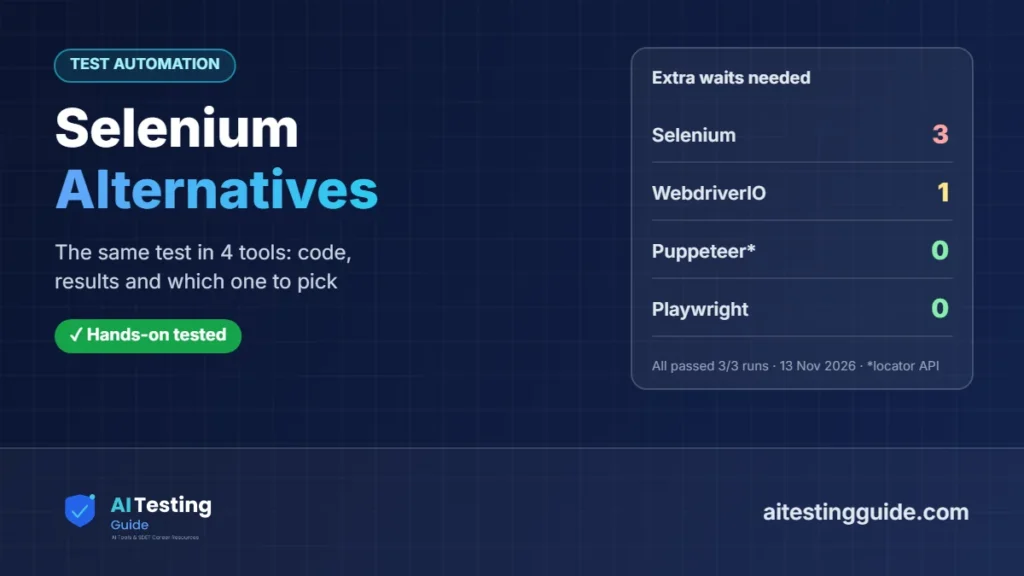
| Selenium 4.52.0 | 2/2 passed, every run | 3.5 s | 33 | 3 (element located, visible, text) |
| Playwright Test 1.63.0 | 2/2 passed, every run | 4.3–4.5 s | 17 + 6 config | 0 |
| WebdriverIO 10.2.0 | 2/2 passed, every run | 3.9–4.1 s | 34 | 1 (wait for the final text) |
| Puppeteer 25.17.0 | 2/2 passed, every run | 3.5 s | 27 | 0 with the locator API |
Here is the purchase test in Selenium and in Playwright. The difference is mostly the waits:
// Selenium (selenium-webdriver 4.52.0)
await driver.get(URL);
await driver.findElement(By.id('user')).sendKeys('demo');
await driver.findElement(By.id('pass')).sendKeys('secret123');
await driver.findElement(By.id('login-btn')).click();
const add = await driver.wait(until.elementLocated(By.id('add')), 5000);
await driver.wait(until.elementIsVisible(add), 5000);
await add.click();
await driver.findElement(By.id('checkout')).click();
const status = driver.findElement(By.id('status'));
await driver.wait(until.elementTextIs(status, 'Order placed'), 5000);
// Playwright Test 1.63.0
await page.goto('/');
await page.getByLabel('User').fill('demo');
await page.getByLabel('Password').fill('secret123');
await page.getByRole('button', { name: 'Log in' }).click();
await page.getByRole('button', { name: 'Add to cart' }).click(); // waits for the late button
await page.getByRole('button', { name: 'Checkout' }).click();
await expect(page.getByRole('status')).toHaveText('Order placed');What failed when we removed the waits?
We also ran a version of the Selenium and Puppeteer tests with no wait before clicking the late button. Both failed at once, as expected: Selenium with NoSuchElementError: no such element: Unable to locate element, and Puppeteer’s older page.click() with No element found for selector: #add. Puppeteer’s newer locator API waited and passed:
// Puppeteer 25.17.0
await page.locator('#add').click();   // locator API: waits, test passes
await page.click('#add');             // older API: no wait, "No element found for selector: #add"
Playwright passed without any extra wait because its actions wait for the element to be visible and enabled. WebdriverIO waited for the button to exist before clicking, but we still wrote a waitUntil for the final text because we ran it in standalone mode; its own test runner adds expect matchers that retry.
A bug we did not expect
On the first run, every tool failed the purchase test. The bug was in our demo page, not the tools: it wrote to a variable called status, which in a browser is the built-in window.status, so “Order placed” never appeared. All four tools reported a clear timeout and Playwright showed the received value (an empty string), which made the bug quick to find. After the fix, every tool passed every run.
Which Selenium alternative should you choose?
- New end-to-end suite, any language: Playwright. Auto-waiting, its own runner, traces and screenshots, and Chromium, Firefox and WebKit. Our Playwright AI guide covers its test agents and MCP server.
- JavaScript front-end team that wants an interactive runner: Cypress. Compare it in Cypress vs Playwright.
- Want to stay on the WebDriver standard (and Selenium Grid or cloud grids): WebdriverIO.
- Chrome automation, scraping or PDFs, not a full test suite: Puppeteer.
- Testers who do not code: an AI or low-code tool (mabl, Testim, Katalon). See best AI testing tools.
- Large, stable Selenium suite in Java or C#: stay, and fix waits and structure first (for example with the Page Object Model).
Are Selenium alternatives free?
The frameworks themselves are free and open source: Playwright and Puppeteer (Apache-2.0), Cypress, WebdriverIO, TestCafe and Nightwatch (MIT), and Selenium (Apache-2.0). Costs come from hosted services around them. For example, Cypress Cloud (recording, analytics, parallel runs) has a free Starter plan with 500 test results a month, a Team plan from $67 a month billed annually ($799 a year) and a Business plan from $267 a month billed annually ($3,199 a year), per its pricing page on 13 Nov 2026. Cloud browser grids and AI testing platforms are paid separately. To run any of these free in CI, see GitHub Actions for test automation.
How do you migrate from Selenium?
- Do not rewrite everything. Write new tests in the new tool and move old ones only when they break or need changes.
- Start with your flakiest tests: they gain the most from automatic waiting.
- Keep your page objects’ structure; the selectors usually carry over, and Playwright also offers role and label locators.
- Run both suites in CI for a while and compare failures before switching off Selenium.
- Count the hidden cost: training, CI changes and reporting. See AI vs traditional test automation if you are also weighing AI tools.
What we did and did not test
- Did: ran 2 identical tests in Selenium 4.52.0, Playwright 1.63.0, WebdriverIO 10.2.0 and Puppeteer 25.17.0, 3 runs each, on 13 Nov 2026 (all passed), plus no-wait variants for Selenium and Puppeteer (both failed as expected).
- Did not: run Cypress. Its npm package installed, but the Cypress app is downloaded separately from Cypress’s own server, which our test machine could not reach. Cypress facts above come from its docs and pricing page.
- Did not: run TestCafe, Nightwatch or any AI tool for this article, or test Firefox, Safari/WebKit, mobile, parallel runs or large suites.
- Did not: benchmark speed. Run times were dominated by browser start-up on a tiny page.
Frequently Asked Questions
What is the best alternative to Selenium?
For most teams starting a new web test suite in 2026, Playwright: it waits for elements automatically, has its own test runner and supports JavaScript/TypeScript, Python, Java and .NET. In our test it needed no extra waits where Selenium needed three.
Is Selenium still used in 2026?
Yes. Selenium is actively maintained (selenium-webdriver 4.52.0 was released on 29 October 2026) and is widely used in large Java, Python and C# suites, especially with Selenium Grid.
Is Playwright better than Selenium?
For new projects it is usually easier, mainly because of automatic waiting and a built-in runner. Selenium still wins on language choice and existing infrastructure. See our full Selenium vs Playwright comparison.
Is Cypress free?
Yes, the Cypress app is free and open source under the MIT licence. Cypress Cloud, the paid dashboard for recording and parallel runs, has a free Starter plan with 500 test results a month and paid plans from $67 a month billed annually (checked 13 Nov 2026).
Is Puppeteer a replacement for Selenium?
For Chrome automation, yes; for a full test suite, only with a test runner added. Puppeteer is a browser automation library. We ran it with Node’s built-in test runner.
Can AI tools replace Selenium?
For some teams. AI and low-code tools such as mabl, Testim and Katalon let testers build tests without code and repair broken locators, but they cost money and give less control than a code framework.
Sources and Versions Checked (13 Nov 2026)
- npm registry, 13 Nov 2026: selenium-webdriver 4.52.0 (Apache-2.0, released 29 Oct 2026), playwright 1.65.0 (Apache-2.0, 5 Nov 2026; we ran 1.63.0), cypress 16.3.0 (MIT, 10 Nov 2026), webdriverio 10.2.0 (MIT), puppeteer 25.17.0 (Apache-2.0), testcafe 3.7.7 (MIT), nightwatch 3.16.0 (MIT)
- Cypress pricing and Cypress Cloud billing docs
- Playwright docs: auto-waiting (actionability)
- Selenium docs: waiting strategies
- Puppeteer docs: page interactions and locators
- Test environment: Chrome for Testing 153.0.8010.12, ChromeDriver 153.0.8010.52, Node.js 22, Linux, 13 Nov 2026

QA automation engineer. Each guide says what I ran myself and what I only researched, and I update it when things change. About me
One useful email a week
New guides, tool price changes and AI testing news. No spam.