If you’ve spent more than five minutes on LinkedIn recently, you’ve probably seen the bold claims: “AI will write all your tests by tomorrow,” or “Say goodbye to test maintenance forever.”
As a QA Engineer who actually builds and maintains test automation frameworks for a living, let me give you the reality check we all need. The truth about AI test automation vs traditional automation in 2026 is far more nuanced than the hype suggests.
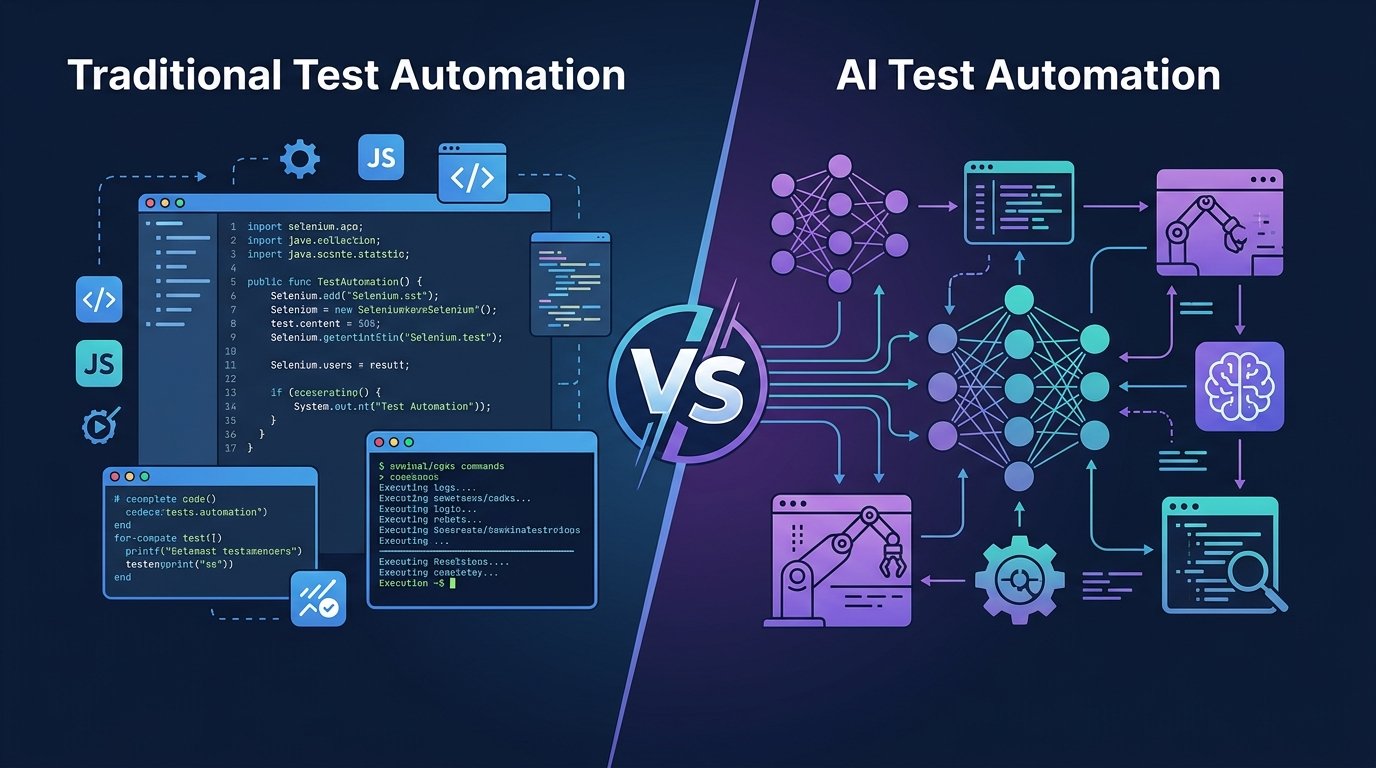
Yes, AI testing tools have evolved massively. But no, they haven’t magically eliminated the need for solid test architecture and critical thinking. The debate of AI test automation vs traditional automation isn’t about which one will “win.” It’s about understanding what each approach actually does, where they shine, and where they fall flat.
In this guide, I’m going to break down both approaches—no marketing fluff, just the unvarnished truth from the trenches. We’ll cover test creation, the real cost of maintenance, flaky tests, and a clear decision framework for choosing the right approach for your team.
Table of Contents
- Key Takeaways
- What is Traditional Test Automation?
- What is AI Test Automation?
- Side-by-Side Comparison Table
- Deep Dive: Test Creation
- Deep Dive: Test Maintenance & Self-Healing
- Deep Dive: Flaky Test Handling
- Deep Dive: CI/CD Integration & Speed
- Deep Dive: Learning Curve & Skills
- Deep Dive: Cost Comparison
- Where AI Testing Falls Short
- Decision Framework: When to Use Which
- Frequently Asked Questions
Key Takeaways
- Traditional test automation (Selenium, Playwright, Cypress) is code-heavy, highly customizable, and requires significant maintenance, but offers unmatched control and execution speed.
- AI test automation (Mabl, Testim, GitHub Copilot, Cursor AI) accelerates test creation and reduces maintenance through self-healing locators, but can be expensive and sometimes obscure the underlying test logic.
- The hybrid approach is winning in 2026. Smart teams are using code-based frameworks (like Playwright) while leveraging AI coding assistants (like Copilot or Cursor) to write the boilerplate, rather than switching to proprietary no-code AI platforms entirely.
- When comparing AI test automation vs traditional automation, remember: AI is incredible at adapting to UI changes, but it still struggles with complex end-to-end business logic that requires domain knowledge.
(Want to know if your job is safe? Read my honest take on Will AI Replace QA Engineers?)
What is Traditional Test Automation?
Traditional test automation is a programmatic approach to software testing where QA engineers write explicit scripts using code (Java, Python, JavaScript, etc.) to interact with an application and verify its behavior.
In traditional automation, you are entirely responsible for finding element locators (CSS selectors, XPaths), writing the interaction logic, handling waits, and validating the results. The script does exactly what you tell it to do—nothing more, nothing less. This level of control is why traditional test automation remains the backbone of enterprise QA in 2026.
The Heavyweights of Traditional Automation
- Selenium: The granddaddy of them all. Still heavily used, still requires a lot of boilerplate.
- Cypress: Revolutionized frontend testing by running in the browser, though it has architectural limitations with multi-tab testing.
- Playwright: Microsoft’s powerhouse. It has largely become the industry standard for traditional automation in 2026 due to its speed, auto-waiting, and cross-browser capabilities.
(Still debating between the modern giants? Check out my deep dive on Cypress vs Playwright 2026.)
What is AI Test Automation?
AI test automation uses artificial intelligence, machine learning algorithms, and large language models (LLMs) to automatically generate, execute, and maintain software tests. It adapts to changes in the application interface autonomously, reducing the need for manual script updates.
AI-powered testing in 2026 generally falls into two buckets when looking at AI test automation vs traditional automation:
- AI-Driven Platforms: Tools like Testim, Mabl, and Katalon. These platforms use ML algorithms to capture dozens of attributes for every web element. When a developer changes an ID or a class name, the AI “self-heals” the test by finding the element based on its other attributes.
- AI Coding Assistants: Tools like GitHub Copilot and Cursor AI. Here, you are still writing code in a traditional framework like Playwright, but the AI is writing 80% of the actual script based on your prompts or context.
(Looking for the right tool? Check out my updated list of the Best AI Testing Tools for this year.)
AI Test Automation vs Traditional Automation: Side-by-Side Comparison
Here’s how AI test automation vs traditional automation stacks up across the key metrics that actually matter to QA teams:
| Feature | Traditional Automation | AI Test Automation |
|---|---|---|
| Test Creation | Manual, requires coding skills. Slower initial setup. | Fast. Uses NLP prompts, recording, or AI auto-completion. |
| Maintenance | High. Locators break easily when UI changes. | Low to Medium. Self-healing algorithms adapt to minor UI shifts. |
| Control & Flexibility | Absolute control over every interaction and assertion. | Sometimes restricted by the platform’s capabilities (black-box). |
| Learning Curve | Steep. Requires solid programming foundation. | Shallower for platforms; steep if managing AI agents/prompts. |
| Flaky Tests | Common due to strict locators and race conditions. | Reduced via dynamic waits and self-healing locators. |
| Vendor Lock-in | Low (open-source tools like Playwright/Selenium). | High for proprietary SaaS platforms (Mabl, Testim). |
| Cost | Free tools, but high cost in engineering hours. | Expensive licensing fees, but saves on maintenance time. |
| CI/CD Speed | Lightning fast — full control over parallelism. | Slower — limited by cloud concurrency and ML overhead. |
| Best For | SDET teams with complex business logic. | Teams with frequent UI changes and manual QA staff. |
Deep Dive: Test Creation — AI Test Automation vs Traditional Automation
Let’s look at how test creation actually feels in the trenches for both approaches.
Traditional Test Creation
When I write a traditional test in Playwright, I have to inspect the DOM, find reliable selectors, write the setup/teardown, and structure the assertions.
Example: Playwright (Traditional Code)
import { test, expect } from '@playwright/test';

test('User can log in successfully', async ({ page }) => {
  await page.goto('https://example.com/login');

  // Explicitly finding locators
  await page.locator('input[name="username"]').fill('zain_qa');
  await page.locator('input[name="password"]').fill('SecurePass123!');
  await page.locator('button[type="submit"]').click();

  // Explicit assertion
  await expect(page.locator('.dashboard-welcome')).toHaveText('Welcome back, Zain');
});
This traditional test automation code is robust, but if the developer changes input[name="username"] to input[id="email_login"], this test fails immediately.
AI Test Creation
With AI-driven testing, creation is fundamentally different. If you use a tool like GitHub Copilot or Cursor AI with Playwright, you write a comment, and the AI generates the code. This is the core advantage in the AI test automation vs traditional automation debate.
Example: Using AI (Cursor/Copilot) for Code Generation
// PROMPT: Write a Playwright test that navigates to /login, logs in as zain_qa,
// clicks submit, and verifies the dashboard welcome message appears.

// AI GENERATED CODE:
test('User can log in successfully', async ({ page }) => {
  await page.goto('/login');
  await page.getByRole('textbox', { name: /username/i }).fill('zain_qa');
  await page.getByRole('textbox', { name: /password/i }).fill('SecurePass123!');
  await page.getByRole('button', { name: /submit/i }).click();
  await expect(page.getByRole('heading', { name: /welcome back/i })).toBeVisible();
});
Notice how the AI naturally opts for accessibility locators (getByRole) which are much more resilient than CSS selectors? That’s the AI applying 2026 best practices instantly. This is why the AI test automation vs traditional automation choice often comes down to your team’s skillset.
If you are using a platform like Mabl or Testim, you might not write code at all. You either record your actions, or write plain English: Navigate to login, Enter username, Click Submit. The AI translates that into executable actions.
(Need help prompting? Read How to Write Test Cases with AI.)
Deep Dive: Test Maintenance & Self-Healing
Maintenance is the silent killer of traditional test automation projects. This is where AI test automation vs traditional automation differences become most obvious.
The Traditional Struggle
In traditional automation, test maintenance is a manual chore. When a release breaks 40 tests because the engineering team migrated to a new component library, a QA engineer has to manually inspect the failures, update the locators, push the code, and re-run the pipeline. I’ve spent entire sprints just doing test maintenance.
The AI Advantage: Self-Healing
AI testing tools solve this using Self-Healing Web Elements. When you record a test in an AI platform, it doesn’t just save the XPath. It extracts a massive data model for that element:
- CSS attributes
- X/Y Coordinates
- Parent/Child DOM relationships
- Inner text
- Tag names
If the test runs and the primary locator is missing, the AI pauses, queries the DOM for an element that matches the majority of the other attributes, and if it finds a 95% match, it interacts with it, passes the test, and alerts you: “Hey, the ID changed, but I found the button and clicked it anyway. Should I update the test permanently?”
This one self-healing feature alone can cut maintenance time by 70% — a massive win in the AI test automation vs traditional automation equation.
Deep Dive: Flaky Test Handling
Flaky tests (tests that pass and fail randomly without code changes) destroy trust in the QA process.
Traditional Automation: Flakiness usually comes from race conditions—the test tries to click a button before the JavaScript has fully attached the event listener, or before the animation finishes. Playwright’s auto-waiting mechanism handles this well, but complex async operations still require custom wait strategies.
AI Automation: AI tools monitor execution patterns over time. If an AI platform notices that a specific API call before a button click takes anywhere from 500ms to 4000ms, it dynamically adjusts the wait time for that specific step based on historical data. It learns the rhythm of your application.
Deep Dive: CI/CD Integration & Execution Speed
Here is where traditional automation still holds a massive edge in the AI test automation vs traditional automation comparison.
Traditional: Frameworks like Playwright execute locally or in your CI/CD pipeline (GitHub Actions, Jenkins, GitLab) at blistering speeds. You can run hundreds of headless tests in parallel across Docker containers in a matter of minutes. You own the infrastructure.
AI Platforms: Platforms like Mabl or Katalon execute tests in their cloud infrastructure. While they integrate easily into CI/CD pipelines via API triggers, you are limited by their cloud concurrency limits. If your license only allows 5 parallel runs, a suite of 500 tests will take significantly longer than if you were running Playwright on your own AWS grid.
Deep Dive: Learning Curve & Skill Requirements
Traditional automation requires Software Engineers in Test (SDETs). You need to understand asynchronous programming, Page Object Models, API mocking, and Git workflows. It takes months to train a junior QA to write production-grade traditional automation.
AI automation democratizes testing. Platforms allow manual testers, product managers, and even business analysts to contribute to the automation suite. However, the rise of AI coding assistants means that even SDETs are becoming drastically more efficient.
The skill required in 2026 is no longer just “writing code.” It’s AI Prompt Engineering for Test Automation. Knowing how to give Cursor AI the right context to generate a flawless test suite is the new superpower. (Learn more: GitHub Copilot for Test Automation)
Deep Dive: Cost Comparison
Cost is often the deciding factor in the AI test automation vs traditional automation decision.
- Traditional: The tools are open-source and free. The cost is entirely in payroll. You need highly paid SDETs to build and maintain it, plus the cost of your CI/CD compute minutes.
- AI Automation: The licensing costs for enterprise AI testing platforms can be staggering—often tens of thousands of dollars a year. However, they allow you to hire less expensive, less technical resources, and they drastically reduce the hours spent on maintenance.
You have to calculate whether the time saved on maintenance outweighs the SaaS subscription fee. For most mid-size teams, the break-even point is around 500+ test cases.
The Honest Reality Check: Where AI Testing Falls Short
I promised to be honest about AI test automation vs traditional automation. AI testing is not a silver bullet. Here is where I see it failing in the real world:
- Complex Business Logic: AI is great at navigating UIs. It is terrible at understanding complex, multi-step business logic. If your test requires validating database records, intercepting specific webhooks, and calculating financial data, AI tools often struggle to grasp the overarching context.
- Vendor Lock-in: If you build 2,000 tests in a proprietary AI tool and they double their pricing, you are stuck. You cannot easily export your tests to Playwright.
- The “Black Box” Problem: When an AI test self-heals incorrectly (e.g., clicks the “Cancel” button instead of the “Submit” button because their DOM structures looked similar), it creates a false positive that is incredibly frustrating to debug.
Decision Framework: When to Use Which?
Still on the fence about AI test automation vs traditional automation? Use this decision framework for your next project.
Choose Traditional Automation (Playwright + TypeScript) If:
- Your application has highly complex, data-heavy business logic.
- You need tests to run at lightning speed in your own CI/CD infrastructure.
- You have a strong team of SDETs or developers willing to write tests.
- You want zero vendor lock-in and open-source flexibility.
- Pro Tip for 2026: Use traditional frameworks, but equip your engineers with GitHub Copilot for Test Automation to get the best of both worlds.
Choose AI Test Automation (Mabl, Testim) If:
- Your application’s UI changes constantly and maintenance is drowning your team.
- You have a team of manual QAs and domain experts who don’t know how to code.
- You are testing standard CRM, E-commerce, or SaaS interfaces where workflows are predictable.
- You have the budget for enterprise licensing and want to prioritize speed of creation over execution speed.
Conclusion: The Hybrid Reality of 2026
The debate of AI test automation vs traditional automation is slowly dissolving. In 2026, the most successful QA teams aren’t choosing one or the other—they are merging them.
We are seeing a massive shift toward using robust, traditional open-source frameworks (like Playwright), supercharged by AI coding assistants (like Cursor) to write the code, while integrating open-source self-healing libraries to handle flaky locators.
AI hasn’t replaced the QA engineer. It has just replaced the boring parts of our jobs. We no longer have to spend hours updating XPaths. Instead, we get to focus on what actually matters: test strategy, edge cases, and ensuring we ship quality software.
What’s your take on AI test automation vs traditional automation? Are you fully migrating to AI platforms, or sticking to code? Let me know in the comments below.
Frequently Asked Questions
Will AI test automation completely replace traditional tools like Selenium?
No. Traditional tools provide granular control and execution speeds that AI platforms currently can’t match. Open-source frameworks like Playwright and Selenium will remain the foundation for complex, enterprise-level testing for the foreseeable future. The future is hybrid — AI test automation vs traditional automation is not a zero-sum game.
How does self-healing work in AI test automation?
Self-healing works by capturing multiple attributes of a web element (ID, class, text, size, relative position) during test creation. If the primary locator breaks due to a UI change, the AI uses machine learning to find the closest matching element based on the remaining attributes, allowing the test to pass and suggesting a permanent fix.
Can I use AI to write traditional test automation scripts?
Absolutely. This is the most popular hybrid approach in 2026. You can use LLM-based coding assistants like GitHub Copilot, ChatGPT, or Cursor AI to generate boilerplate code, write complex assertions, and create mock data for traditional frameworks like Cypress and Playwright.
Are AI testing tools secure for enterprise data?
It depends on the vendor and deployment model. Cloud-based AI platforms require your application to be accessible, which can be an issue for highly secure environments. Additionally, feeding proprietary code into public LLMs is a security risk. Always look for tools that offer enterprise-grade data privacy and zero-retention policies.
Which approach is better for manual testers?
AI test automation platforms (like Testim, Mabl, or Katalon) are significantly better for manual testers. They offer low-code/no-code interfaces, natural language processing, and record-and-playback features that don’t require deep programming knowledge.
Do AI testing tools run slower than traditional scripts?
Generally, yes. Cloud-based AI testing tools have execution overhead due to the machine learning algorithms processing the DOM in real-time, and you are subject to the vendor’s cloud concurrency limits. Traditional scripts running on a dedicated local or CI server will almost always execute faster.