
Some links on this page may be affiliate links. They never change a rating. Details
Playwright has two AI features, and both are free and open source (Apache-2.0). Playwright Test Agents are three ready-made agents, a planner, a generator and a healer, that write a test plan, turn it into tests and repair failing ones. Playwright MCP is a server that lets an AI assistant control a real browser. Both need an AI tool such as VS Code, Claude Code or Codex to drive them, and the model usage is billed by that tool, not by Playwright.
We checked everything here against Playwright’s documentation on 9 November 2026, ran the setup command with Playwright 1.65.0, and then ran the planner, generator and healer workflow against a small demo app. The results are in We Ran the Agents: What Happened. The demo app was small and ran on a local machine, so treat our results as an illustration and not a benchmark of how the agents perform on a large production app.
What Are Playwright Test Agents?
Playwright’s documentation describes three agents that ship with Playwright Test. You can use them on their own, one after another, or in a loop:
- Planner: explores your app and writes a Markdown test plan.
- Generator: turns that Markdown plan into Playwright test files, checking selectors and assertions against the live app as it goes.
- Healer: runs your tests and, when one fails, replays the steps, inspects the page, suggests a fix such as a new locator or wait, and re-runs until the test passes or a guardrail stops it. If it decides the feature itself is broken, it skips the test instead.
Run in order, the three give you a plan in specs/, tests in tests/ and repairs when the app changes.
How to Set Up Playwright Test Agents
- Install Playwright Test in your project:
npm i -D @playwright/test. - Generate the agent definitions for the AI tool you use:
npx playwright init-agents --loop=claude(other values includevscode; the docs also list Codex and OpenCode). - Open your AI tool in that folder and ask the planner agent for a plan, for example “Generate a plan for guest checkout.”
- Ask the generator agent to write tests from the plan in
specs/. - When a test fails, give the healer agent the failing test name.
Playwright says to regenerate the agent definitions whenever you update Playwright, so they pick up new tools and instructions. For VS Code, the docs state that VS Code 1.105 (released 9 October 2025) or newer is needed.
What the Setup Command Created (We Ran It)
We ran npx playwright init-agents --loop=claude in an empty project with Playwright 1.65.0 on 9 November 2026. It created these files:
.claude/agents/playwright-test-planner.md,playwright-test-generator.mdandplaywright-test-healer.md: one agent definition per agent. Each is a short instruction file of about 3 KB, and each lists the browser tools it may use..mcp.json: registers an MCP server namedplaywright-test, started withnpx playwright run-test-mcp-server.seed.spec.ts: an empty starter test with a comment that says “generate code here”. The planner uses a seed test like this to set up the environment before it explores.specs/README.md: a placeholder for test plans.
Running it with --loop=vscode instead created the same agent definitions under .github/agents/ as .agent.md files, plus a VS Code .vscode/mcp.json and a GitHub workflow file named copilot-setup-steps.yml. The takeaway: the “agents” are plain text files in your repository. You can read them, edit them and keep them in version control. They are not a hidden service.
We Ran the Agents: What Happened
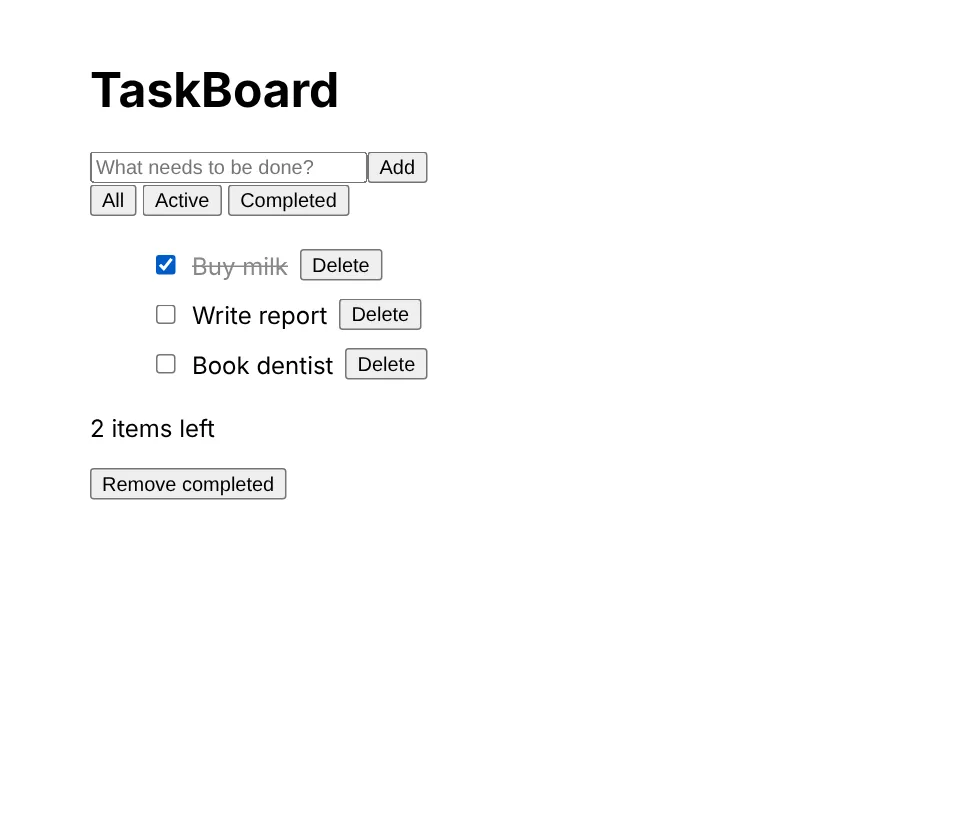
To see the agents work, we built a small to-do app called TaskBoard and ran Playwright’s own agent server (npx playwright run-test-mcp-server) against it. We used a local demo app because our testing environment cannot reach public websites, so this is not a test of aitestingguide.com or of any real product. An AI model has to drive the agents; Playwright’s docs say you can choose the tool, and we used Claude to call the agent tools.
Step 1: The planner explored the app and saved a plan
The planner ran our seed test to open the app, then clicked through it: adding tasks, trying a blank task, ticking a task, switching the Active and Completed filters and clearing completed tasks. It saved a plan file, specs/taskboard.plan.md, with six scenarios, each with numbered steps and expected results. The plan was readable Markdown that a non-programmer could review.
Step 2: The generator wrote six tests and they passed
For each scenario the generator opened a fresh page, performed the steps live, and logged the Playwright code for every action. It then wrote one test file per scenario. All six passed in about two seconds. Here is the generated test for adding a task:
test('Add a task', async ({ page }) => {
  await page.goto('/');
  // Add Buy milk
  await page.getByRole('textbox', { name: 'New task' }).fill('Buy milk');
  await page.getByRole('textbox', { name: 'New task' }).press('Enter');
  // Task appears in list
  await expect(page.getByText('Buy milk')).toBeVisible();
  // Counter shows 1 item left
  await expect(page.getByText('item left')).toBeVisible();
});
The locators use accessible roles and names, which is the style Playwright recommends. Note that the last check matches the text “item left”, a shorter string than the “1 item left” we asked for. It still works, but it is looser than the plan.
Step 3: The healer scenario: we renamed two labels
We then changed the app the way a real redesign might: the input’s label became “Task title” and the “Clear completed” button became “Remove completed”. All six tests failed, as expected. Debugging a failing test paused it at the error and showed the live page, where the new labels were visible. We then made the change the healer is instructed to make: update the locators to match the live page and re-run. About 20 lines changed across the six files and all six passed again.
Step 4: What happens with a real bug?
A renamed label is not a bug. We also introduced two real bugs, one at a time, to see what the generated tests caught:
- Counter bug (the “items left” count included finished tasks): one of the six tests failed, the “Complete a task” test. The other five passed.
- Broken filters (every filter showed every task): all six generated tests still passed. The filter test only checked that the right task was visible, not that the other task was hidden. After we added two
toBeHidden()checks, the test failed on the broken app and passed on the working one.
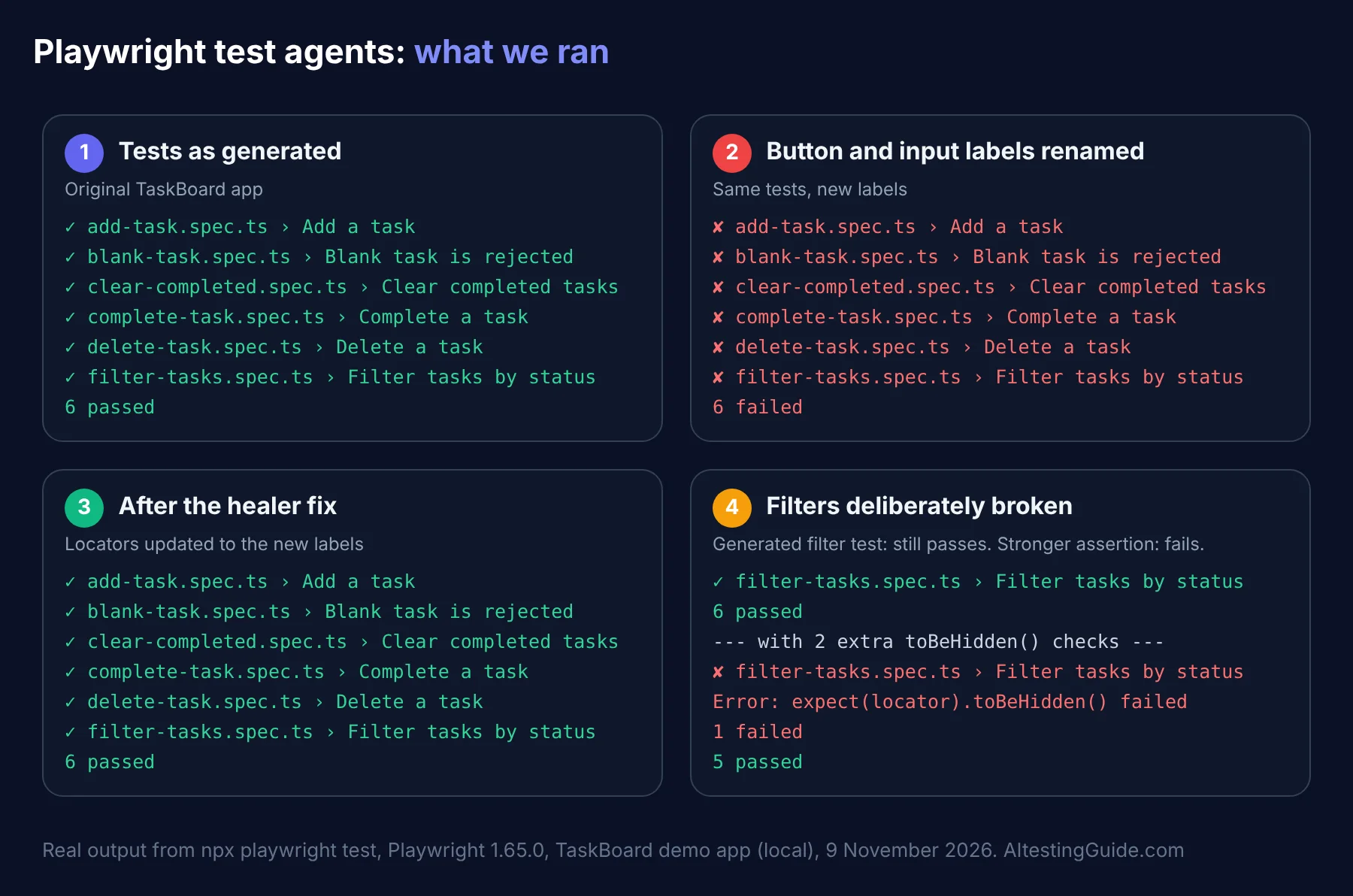
The lesson is the one that matters most: the agents are fast at producing tests that pass, but passing is not the same as testing the right thing. A person still has to review the assertions. A label rename shows up as a missing locator, while a real bug shows up as a failed assertion, and you should investigate the app, not edit the test, when you see the second kind.
Rough edges we hit
- Tool arguments changed. In 1.65 the browser tools required
targetandintentfields; calls written in the older style failed validation. An AI client that updates with Playwright handles this, but custom scripts may not. - One listed tool did not work.
browser_checkappeared in the tool list but returned “Tool not found” when we called it, so we ticked checkboxes with a click instead. - The browser build must match. Playwright 1.65.0 wanted a newer Chromium build than our environment had installed, so we pointed the config at an installed Chromium.
- Failing runs are slow. With default timeouts, six failing tests took more than two minutes. We used shorter timeouts for our comparison runs.
We did not test the agents on a large or complex app, on login flows, or on dynamic pages, so we cannot say how they scale.
What Is Playwright MCP?
Playwright MCP is a separate server, published as @playwright/mcp (Apache-2.0), that lets an AI assistant operate a browser through the Model Context Protocol. According to Playwright’s documentation it works from structured accessibility snapshots of the page, not screenshots, so no vision model is needed. The page is described to the model as roles and text, and the model refers to elements by an id from that snapshot.
Add it to an MCP client with this standard configuration, or in Claude Code with claude mcp add playwright npx @playwright/mcp@latest:
{
  "mcpServers": {
    "playwright": {
      "command": "npx",
      "args": ["@playwright/mcp@latest"]
    }
  }
}
Useful options from the documentation: --headless (it runs headed by default), --browser with chrome, firefox, webkit or msedge, --isolated for a fresh profile each session, and --idle-timeout. The server can also click, type, take screenshots, read the console and network requests, mock API routes and save login state.
A security note
Playwright’s own docs warn that the browser_run_code_unsafe tool runs arbitrary JavaScript in the server process and is “RCE-equivalent”, so enable it only for clients you trust. They also say tools that a web page registers through the experimental WebMCP API come from the page, so treat them as untrusted input. Do not point an agent with broad access at pages you do not control.
Test Agents vs Playwright MCP: Which Do You Need?
| Playwright Test Agents | Playwright MCP | |
|---|---|---|
| What it is | Planner, generator and healer agent definitions | A server that gives an AI assistant browser tools |
| Main output | A Markdown plan and Playwright test files | Whatever the assistant does: browse, click, check, report |
| Set up with | npx playwright init-agents | Add @playwright/mcp to your MCP client |
| Best for | Building and maintaining a test suite | Exploring an app or checking a page with an assistant |
| Licence | Apache-2.0 (part of Playwright) | Apache-2.0 |
Interestingly, the generated agent files themselves use browser tools from an MCP server, so the two are related: the test agents are instructions that sit on top of MCP-style browser tools.
Is It Really Free?
Playwright, the test agents and Playwright MCP are open source and free to use. But the agents need an AI tool to run them, and that tool may cost money. For example, the generated Claude Code agent files ask for the sonnet model, so a Claude Code user pays for that usage under their own plan. Check your tool’s pricing. For other free options, see our list of free and open-source AI testing tools.
What to Watch Out For
- Review every assertion. Playwright’s docs say generated tests may contain initial errors. In our run the tests passed even with the filters completely broken, because one assertion was too weak. Read generated tests and ask what bug each one would catch.
- The healer can hide real bugs. A test that “heals” by changing a locator might be hiding a genuine change. Check what it changed. Playwright says it skips a test if it believes the functionality is broken.
- Keep a human in the loop for assertions. An AI can check that a button exists; deciding what the app should do is still your job.
- Regenerate after upgrades. Agent definitions need refreshing when Playwright updates.
- Mind your data. Agents that browse your app send page content to your AI model, so do not run them against real customer data.
Who Should Use Playwright AI Features?
They suit QA engineers and developers who already use, or are willing to adopt, Playwright and an AI coding tool. If you are comparing frameworks first, read Cypress vs Playwright. If you have a large Selenium suite, see our guide to Selenium frameworks before you migrate. For the wider picture, see agentic testing, GitHub Copilot for test automation and Cursor AI for test automation.
When a Paid Tool Makes Sense
Playwright gives you the engine and the agents, but you assemble the rest: reporting, device clouds, visual review and support. If you want those included, compare platforms in our best AI testing tools hub and our visual testing guide. To run Playwright across many real browsers and devices, see our BrowserStack review.
Frequently Asked Questions
What are Playwright Test Agents?
They are three agents that come with Playwright: a planner that writes a Markdown test plan, a generator that turns it into Playwright tests, and a healer that repairs failing tests. You add them with npx playwright init-agents.
Is Playwright MCP free?
Yes. @playwright/mcp is open source under the Apache-2.0 licence. The AI assistant that uses it may have its own costs.
What is the difference between Playwright MCP and Playwright Test Agents?
Playwright MCP is a server that gives an AI assistant tools to control a browser. The Test Agents are ready-made planner, generator and healer instructions for building and fixing a test suite.
Which AI tools work with Playwright Test Agents?
Playwright’s documentation lists VS Code, Claude Code, Codex and OpenCode as options for init-agents. VS Code needs version 1.105 or newer.
Will the healer agent fix my flaky tests automatically?
It replays failing steps, inspects the page and suggests a patch such as a locator update or a wait change, then re-runs until the test passes or a guardrail stops it. Review its changes, because a patch can hide a real bug.
Do I need to know Playwright to use the agents?
It helps. The agents write ordinary Playwright code, and you need to read and review that code. Start with the Playwright getting-started guide if you are new.
Are the tests the agents generate good enough to trust?
They are a good first draft, not a finished suite. In our demo run the generated tests passed, used sensible locators and caught one of two deliberate bugs. They missed the other because an assertion was too weak. Review every assertion before relying on them.
Sources
- Playwright documentation: Test Agents (read 9 November 2026)
- Playwright documentation: Playwright MCP (read 9 November 2026)
- npm package pages for
playwright1.65.0 and@playwright/mcp(Apache-2.0), checked 9 November 2026 - Our own runs with Playwright 1.65.0 on 9 November 2026:
npx playwright init-agents, and the planner, generator and healer workflow against a local demo app

QA automation engineer. Each guide says what I ran myself and what I only researched, and I update it when things change. About me
One useful email a week
New guides, tool price changes and AI testing news. No spam.