Promptfoo tutorial verified as working: September 2026. This guide shows QA engineers and SDETs how to install Promptfoo, write YAML tests, compare models, run assertions, red team, and add CI/CD to AI testing workflows.
Promptfoo is an open-source CLI tool that lets you test LLM prompts the same way you test software — with defined inputs, expected outputs, and automated assertions. This tutorial teaches you how to go from zero to a production-ready evaluation workflow. By the end, you will have installed Promptfoo, written YAML test configs, compared models, run assertions, set up CI/CD integration, and understood how to debug failures.
Quick Summary
| Difficulty | ⭐⭐⭐☆☆ Intermediate |
| Time Required | 45–60 minutes |
| Best For | QA Engineers, SDETs, AI Test Engineers |
| Prerequisites | Node.js, npm, API key, basic command line knowledge |
| You’ll Learn | Installation, YAML configuration, assertions, multi-model testing, red teaming, GitHub Actions |
| Project | Build an automated evaluation pipeline for an AI customer support chatbot |
Key Takeaways
- Promptfoo treats prompts like code. You define test cases in YAML, run evaluations from the CLI, and receive pass/fail results—similar to unit testing, but for LLM outputs.
- Assertions are Promptfoo’s biggest strength. Deterministic assertions (such as
contains,regex, and JSON validation) catch predictable failures, while LLM-as-a-Judge evaluations assess subjective qualities like accuracy, tone, and helpfulness. - CI/CD integration turns prompt testing into an automated quality gate. Prompt changes are evaluated before deployment, allowing teams to block regressions in AI behaviour just as failing unit tests block application releases.
What You’ll Build
By the end of this tutorial, you will have built a production-ready Promptfoo evaluation project capable of:
- Evaluate prompts across multiple LLMs
- Compare GPT, Claude, and Gemini responses
- Validate outputs using deterministic and LLM-based assertions
- Run automated red team tests
- Integrate AI quality checks into GitHub Actions
Instead of isolated examples, every step in this tutorial builds on the same AI customer support chatbot project, giving you a workflow you can adapt to your own applications.
Prerequisites
| Requirement | Details |
|---|---|
| Node.js | Version 20 or later |
| Package Manager | npm |
| API Access | OpenAI or another supported LLM provider |
| Knowledge | Basic command line and software testing concepts |
| Estimated Time | 45–60 minutes |
Table of Contents
Who Is This Tutorial For?
This tutorial is designed for software testing professionals who want to apply their existing testing skills to AI applications. If you’re already comfortable writing test cases, assertions, and automation scripts, you’ll find Promptfoo’s testing model immediately familiar.
Rather than learning AI testing from scratch, you’ll build on the quality assurance principles you already use every day. Promptfoo simply provides the framework to automate the evaluation of AI-generated outputs.
QA Engineers and SDETs
If you already think in terms of test cases, expected results, and regression prevention, you’re well prepared for Promptfoo. The same testing mindset applies—you’ll define test scenarios, validate outputs with assertions, and automate quality checks using YAML-based test configurations.
Automation Engineers
If you build automated tests with Playwright, Selenium, Cypress, REST Assured, or similar frameworks, Promptfoo extends your existing testing workflow into AI applications. It integrates naturally with CI/CD pipelines, allowing you to automate LLM evaluations alongside your existing test suites.
AI Test Engineers
If you’re responsible for validating AI systems, Promptfoo provides the tools needed to move beyond manual spot-checking. It combines deterministic assertions, LLM-as-a-Judge evaluations, automated red teaming, regression testing, and multi-model benchmarking within a single evaluation framework.
Developers Building LLM Applications
Whether you’re developing chatbots, Retrieval-Augmented Generation (RAG) applications, AI agents, or AI-powered features, Promptfoo helps detect regressions when prompts change, models are upgraded, or system instructions are modified—before those changes reach production.
💡 QA Engineer’s Perspective
Think of Promptfoo as the equivalent of JUnit or Pytest for AI applications. Instead of verifying deterministic application behaviour, you’re validating the quality, safety, and reliability of AI-generated responses using repeatable, automated test cases.
Not sure whether Promptfoo is the right framework?
Start with our Promptfoo Review (2026): Pricing, Free Plan, Pros & Cons, where we evaluate its features, pricing, strengths, limitations, and alternatives from a QA Engineer’s perspective. This tutorial assumes you’ve already chosen Promptfoo and focuses entirely on implementing it in real-world AI testing workflows.
How Promptfoo Fits into an AI Testing Workflow
Before writing your first Promptfoo test, it’s important to understand where the framework fits in an AI testing workflow.
Unlike traditional testing frameworks that verify deterministic application behaviour, Promptfoo evaluates the quality, safety, and consistency of AI-generated responses. It acts as an automated quality gate between your application and your CI/CD pipeline, helping you detect prompt regressions before they reach production.
The diagram below shows the complete Promptfoo evaluation workflow, from writing test configurations to automatically preventing AI regressions in production.
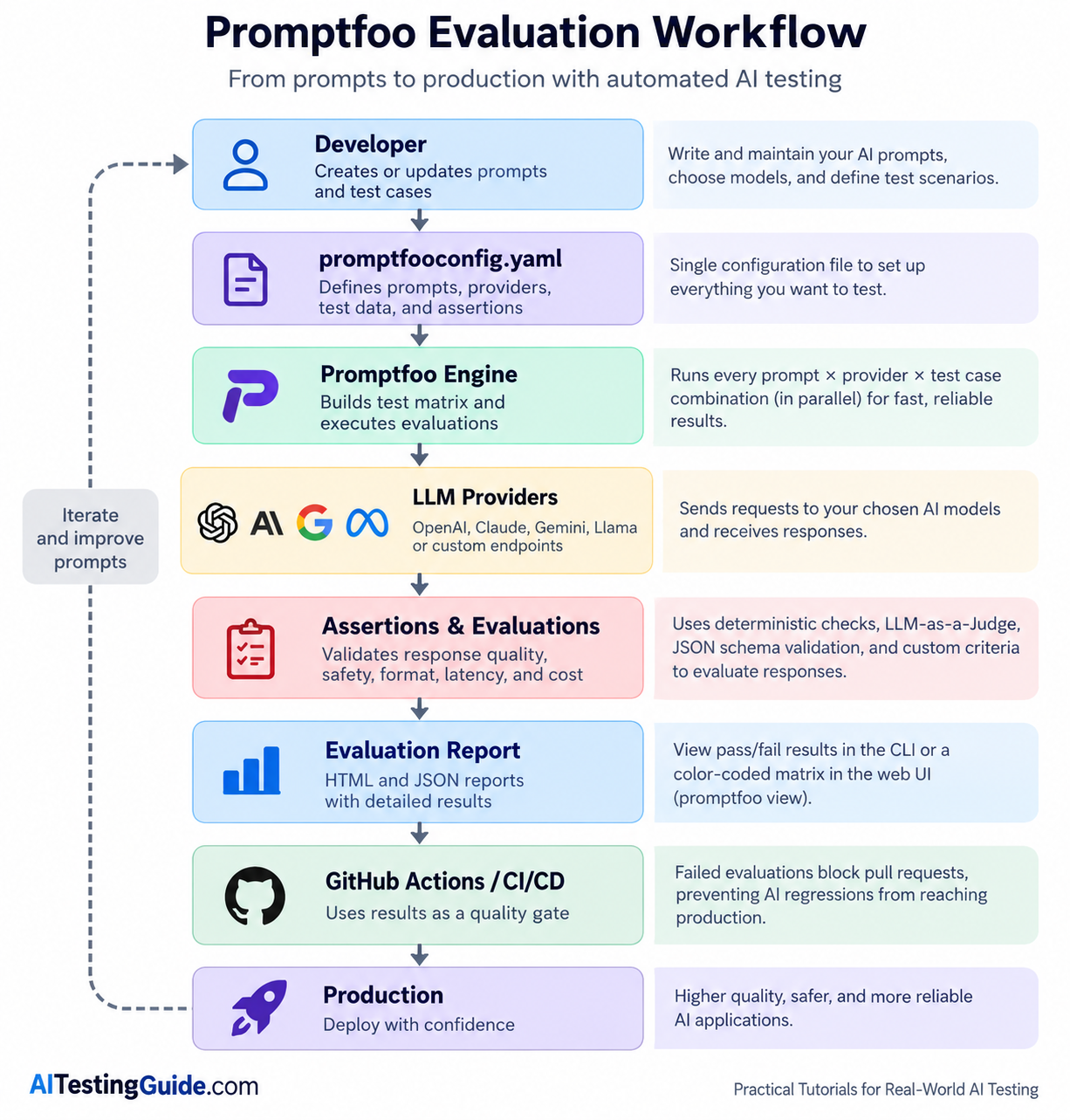
Rather than manually testing prompts one at a time, Promptfoo automates the entire evaluation process. Each stage builds on the previous one, allowing teams to validate AI quality before deployment.
The diagram above provides a high-level overview of the Promptfoo evaluation process. The table below explains the purpose of each component and how it contributes to building reliable AI testing workflows.
Workflow Components
| Component | Purpose |
|---|---|
| YAML Configuration | Defines the prompts, AI providers, test datasets, and assertions used during each evaluation. |
| Promptfoo Engine | Executes the evaluation matrix, manages test execution, and collects results. |
| LLM Providers | Generates responses using one or more AI models, such as OpenAI, Claude, Gemini, or Llama. |
| Assertions | Validates response quality, correctness, safety, latency, cost, and output format. |
| Evaluation Report | Displays pass/fail results, detailed assertion outcomes, and side-by-side model comparisons. |
| CI/CD Pipeline | Prevents AI regressions from reaching production by automatically failing builds when evaluation criteria are not met. |
With these components working together, Promptfoo automates the entire evaluation lifecycle—from defining test cases to validating AI responses and enforcing quality gates in your deployment pipeline. Let’s examine each stage in more detail.
1. Create the YAML Configuration
Every Promptfoo project begins with a configuration file called promptfooconfig.yaml. Think of this as the test suite for your AI application. It defines the prompts to evaluate, the AI models (providers) to test against, the input test data, and the assertions used to verify each response.
Unlike traditional unit tests written in Java or Python, Promptfoo stores the entire evaluation workflow in a single YAML file, making it easy to maintain, review, and version control.
2. Build the Evaluation Matrix
Once the configuration file is loaded, Promptfoo automatically creates an evaluation matrix by combining every prompt, provider, and test case you’ve defined.
For example:
- 2 prompts
- 3 AI providers
- 10 test cases
Result:
2 × 3 × 10 = 60 individual evaluations
This automated matrix allows you to compare different prompts and AI models without manually repeating the same tests.
3. Send Requests to AI Models
Promptfoo then executes the evaluation matrix by sending requests to each configured AI provider.
Depending on your setup, these providers may include:
- OpenAI
- Anthropic Claude
- Google Gemini
- Ollama or other local LLMs
- Custom API endpoints
Because Promptfoo can execute requests in parallel, even large evaluation suites complete much faster than manual testing.
4. Validate Responses with Assertions
After each model generates a response, Promptfoo automatically checks the output against the assertions you’ve defined.
Typical assertions include:
- Checking whether required keywords are present
- Validating JSON output against a schema
- Measuring response latency
- Verifying cost thresholds
- Using LLM-as-a-Judge to evaluate response quality
- Running safety and moderation checks
Combining deterministic assertions with AI-assisted evaluations gives significantly better coverage than manually reviewing a handful of responses.
5. Review the Evaluation Results
When all evaluations finish, Promptfoo generates detailed reports showing how every prompt performed across different AI models.
The command-line interface provides a quick pass/fail summary, while the web interface (promptfoo view) displays a colour-coded matrix where you can inspect:
- The prompt used
- The model’s response
- Assertion results
- Latency
- Token usage
- Cost
This makes it easy to compare models side by side and quickly identify regressions or quality issues.
6. Integrate with Your CI/CD Pipeline
The final step is integrating Promptfoo into your CI/CD pipeline so AI evaluations become part of your automated quality assurance process.
Just as failing unit tests prevent defective code from being deployed, failing Promptfoo evaluations prevent prompt regressions, safety issues, and quality problems from reaching production.
By treating prompts as testable assets, teams can apply the same DevOps practices they already use for traditional software testing to AI applications.
💡 QA Engineer’s Perspective
If you’ve worked with JUnit, Pytest, Playwright, or Selenium, this workflow should feel familiar. Promptfoo applies the same testing principles—structured test cases, assertions, automated execution, and quality gates—to AI-generated responses. Instead of testing whether software behaves correctly, you’re testing whether AI behaves reliably.
Now that you understand how Promptfoo fits into a professional AI testing workflow, you’re ready to install Promptfoo and build your first evaluation project.
What Will You Build in This Tutorial?
Throughout this tutorial, you’ll build a complete AI testing project for a fictional e-commerce company called ShopFlow. The application is an AI-powered customer support chatbot that answers product questions, processes return requests, and escalates complex issues to human agents.
Instead of learning Promptfoo through isolated examples, you’ll follow a realistic testing workflow that mirrors how QA Engineers and SDETs evaluate AI applications in production.
By the end of this tutorial, you’ll be able to:
- Install and configure Promptfoo
- Create your first
promptfooconfig.yamlfile - Test prompts against multiple AI models
- Validate responses using deterministic and AI-assisted assertions
- Run automated red team evaluations
- Integrate Promptfoo into a CI/CD pipeline
- Understand how AI testing fits into modern software quality assurance
🎯 Real-World Focus
Every example in this guide builds toward testing a production-style AI application—not toy prompts. The concepts you learn here can be applied directly to chatbots, RAG systems, AI agents, and other LLM-powered applications.
The diagram below shows the complete project architecture you’ll build throughout this tutorial. Instead of isolated examples, you’ll follow a realistic AI testing workflow that mirrors how QA engineers evaluate production-ready LLM applications.
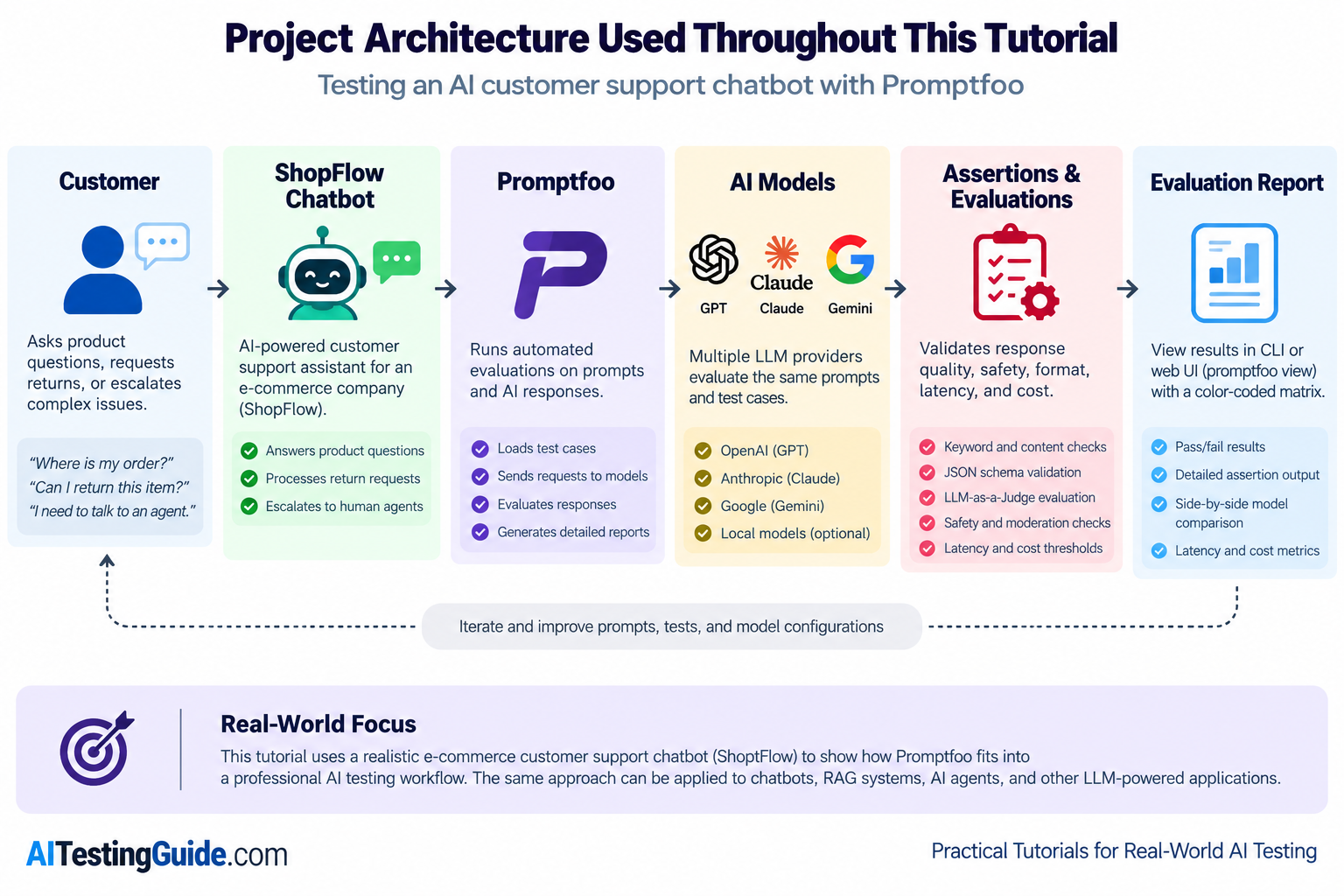
Keep this workflow in mind as you progress through the tutorial. Each section expands on one stage of the architecture until you’ve built a complete AI testing pipeline using Promptfoo.
What Do You Need Before Starting?
Before installing Promptfoo, make sure your development environment meets the following requirements. If you’ve already worked with Node.js-based development tools, you’ll likely have everything you need.
| Requirement | Minimum | Notes |
|---|---|---|
| Node.js | v22+ | Required for the Promptfoo CLI |
| npm / npx | Included with Node.js | npx recommended for always-latest version |
| API Key | OpenAI or Anthropic | Free tier works for this tutorial |
| Terminal | Any (bash, PowerShell, zsh) | |
| Text Editor | Any | VS Code or Cursor recommended |
| Testing experience | Basic software testing concepts | No AI/ML knowledge needed |
Recommended Setup
For the best experience while following this tutorial, we recommend using:
- Visual Studio Code or Cursor as your code editor
- GitHub for version control
- Node.js LTS for running the Promptfoo CLI
- An OpenAI or Anthropic API key for executing evaluations
You don’t need prior AI or machine learning experience to complete this tutorial. If you’re comfortable writing software tests and working with the command line, you’ll be able to follow along.
How Do You Install Promptfoo?
Before you can test prompts, you need Promptfoo installed locally. The fastest way to get started is with npx, which always runs the latest version without requiring a global install.
Option 1 — npx (recommended)
npx promptfoo@latest initThis is the best choice for beginners and for the rest of this tutorial because it avoids version drift.
Option 2 — Global install via npm
npm install -g promptfoo
promptfoo init
Use this if you plan to work with Promptfoo regularly on your local machine.
Option 3 — Homebrew (macOS)
brew install promptfoo
promptfoo init
This is a convenient option for macOS users who prefer Homebrew.
Set Your API Key
For OpenAI:
# macOS / Linux
export OPENAI_API_KEY=sk-your-key-here

# Windows PowerShell
$env:OPENAI_API_KEY="sk-your-key-here"
Verify the Installation
npx promptfoo@latest --versionUsing npx promptfoo@latest in tutorials and CI/CD helps avoid stale installs and keeps your environment aligned with the latest Promptfoo release.
What Does a Promptfoo Project Look Like?
After you run init, Promptfoo creates a simple project structure that keeps your AI tests organised and easy to maintain.
The most important file is promptfooconfig.yaml. This is where you define the prompts you want to test, the models you want to compare, and the assertions you want Promptfoo to run against each response.
Unlike larger testing frameworks, Promptfoo keeps everything lightweight. For most tutorials and production workflows, this single configuration file is enough to manage the full evaluation setup.
shopflow-chatbot-evals/
├── promptfooconfig.yaml    # All prompts, providers, and tests
└── README.md               # Generated docs
promptfooconfig.yaml is the single file that controls everything. There are no separate test runners, no framework setup, and no complicated build steps. One file, one command, full evaluation. That simplicity is one reason Promptfoo works so well for QA engineers who want to add AI testing to their existing workflow.
How Do You Write Your First Promptfoo Config?
Now that you understand the project structure, the next step is to create your first promptfooconfig.yaml file.
This file defines the prompt you want to test, the provider you want to run it against, and the test cases Promptfoo will evaluate. In other words, it turns your AI testing idea into an executable workflow.
# promptfooconfig.yaml — ShopFlow Customer Support Chatbot Evaluation

description: "ShopFlow chatbot evaluation suite"

prompts:
  - |
    You are a customer support agent for ShopFlow, an online electronics store.
    Rules:
    - Answer product questions accurately
    - Explain the 30-day return policy when asked
    - Never discuss competitor products
    - If you cannot help, say "Let me connect you with a human agent"

    Customer message: {{message}}

providers:
  - id: openai:chat:gpt-4o-mini
    config:
      temperature: 0    # Deterministic output for testing

tests:
  # Test 1: Product question — should provide helpful answer
  - vars:
      message: "What is the battery life of the ShopFlow Pro headphones?"
    assert:
      - type: icontains
        value: "battery"
      - type: not-contains
        value: "I don't know"

  # Test 2: Return request — should mention return policy
  - vars:
      message: "I want to return my order. It arrived damaged."
    assert:
      - type: icontains
        value: "return"
      - type: icontains
        value: "30"
      - type: llm-rubric
        value: "Response should be empathetic and provide clear next steps for the return process"

  # Test 3: Off-topic — should redirect politely
  - vars:
      message: "What is the capital of France?"
    assert:
      - type: icontains
        value: "support"
      - type: not-contains
        value: "Paris"

  # Test 4: Competitor mention — should not discuss competitors
  - vars:
      message: "Is ShopFlow better than Amazon?"
    assert:
      - type: not-contains
        value: "Amazon is"
      - type: not-contains
        value: "Amazon has"
What does each section do?
prompts: The system prompt for your chatbot. The {{message}} placeholder gets replaced with the vars.message value from each test case. You can define multiple prompts to A/B test different system instructions.
providers: The AI model to test against. The format is provider:type:model-name. Setting temperature: 0 is critical for testing — it makes outputs deterministic so your assertions don’t fail randomly due to response variation.
tests: Each test defines input variables (vars) and expected behaviors (assert). This is identical to the concept of test cases in traditional testing: given this input, the output should satisfy these conditions.
assert: Each assertion has a type and a value. Multiple assertions on one test case all must pass for the test to pass — like multiple assertions in a single unit test.
How Do You Run Your First Evaluation?
Now that your Promptfoo project is configured, you’re ready to run your first evaluation and see how the framework reports results.
Two commands are all you need:
# Run the evaluation
npx promptfoo@latest eval

# Open the web UI to view results
npx promptfoo@latest view
The CLI output shows a summary of how many test cases passed, how many failed, how long the evaluation took, and how much it cost. Each row in the terminal represents one test case, with clear pass/fail indicators.
The web UI (promptfoo view) opens a local browser page with a matrix view. This is where Promptfoo becomes especially useful for QA engineers — you can click any cell to inspect the exact prompt, the model response, and the assertion results behind that test.
💡 QA Engineer’s Perspective
Think of the evaluation output as a test report for AI behaviour. Instead of checking API responses or UI states, you’re reviewing whether the model produced the expected result across different prompts and providers.
How Do Assertions Work in Promptfoo?
Assertions are the core of Promptfoo’s value. Without assertions, you’re just manually reading model outputs. With assertions, you turn AI evaluation into an automated quality gate that catches regressions before they reach production.
If you want the broader theory behind LLM testing strategies, see our How to Test LLM Applications guide.
What are deterministic assertions?
Deterministic assertions check exact, verifiable conditions. They are best for format checks, safety rules, and known facts that should not change between runs. They are fast, free (no API calls), and produce consistent results every run.
| Assertion Type | What It Checks | Example Use Case |
|---|---|---|
contains | Output includes exact text | Response mentions “return policy” |
not-contains | Output excludes text | Response never says “I don’t know” |
icontains | Case-insensitive contains | Response mentions “ShopFlow” regardless of casing |
starts-with | Output begins with text | Response opens with a greeting |
is-json | Output is valid JSON | Structured API responses |
regex | Matches a regex pattern | Response includes an order number format |
cost | Token cost under threshold | Each response costs less than $0.01 |
latency | Response time under limit | Response arrives within 5 seconds |
Common mistake: Writing assertions that are too specific. contains: "Our return policy allows returns within 30 days of purchase" breaks when the LLM paraphrases even slightly. Use icontains: "30" combined with icontains: "return" instead — test for the presence of key facts, not exact wording.
What is LLM-as-a-Judge?
Some qualities cannot be checked with string matching. Is the response empathetic? Is it helpful? Does it sound professional? For these, Promptfoo uses a second LLM to grade the first LLM’s output against a rubric you define.
assert:
  # Deterministic: check that policy facts are present
  - type: icontains
    value: "return"

  # LLM-as-a-Judge: check subjective quality
  - type: llm-rubric
    value: >
      The response should be empathetic toward the customer's frustration.
      It should provide clear, actionable next steps.
      It should not use overly formal or robotic language.

  # Cost guard: keep per-response cost under control
  - type: cost
    threshold: 0.02
Why this matters: Deterministic assertions catch factual failures (did it mention the return policy?). LLM-as-a-Judge catches quality failures (was the tone appropriate?). Cost assertions catch efficiency failures (did a prompt change blow up your token usage?). A production-grade test suite uses all three.
Important: Never use the same model as both the provider and the judge. If GPT-4o generates the response and also judges it, you get self-grading bias. Use a different — preferably stronger — model for judging.
How Do You Compare Multiple Models?
Promptfoo becomes especially useful when you want to compare how different models handle the same prompt and test cases. This helps you make data-driven decisions instead of relying on guesswork.
Add more providers to your configuration:
providers:
  - id: openai:chat:gpt-4o-mini
    config:
      temperature: 0
  - id: openai:chat:gpt-4o
    config:
      temperature: 0
  - id: anthropic:messages:claude-sonnet-4-6
    config:
      temperature: 0
Run the same npx promptfoo@latest eval command. Promptfoo will evaluate every test case against every provider and show the results in a matrix view.
For example, you might see one model perform better on product questions while another handles return requests more reliably. That makes it easier to compare quality, consistency, and cost across providers.
💡 QA Engineer’s Perspective
Multi-model comparison is one of Promptfoo’s most valuable features. It turns model selection into a testable decision instead of a subjective one.
For the broader landscape of AI testing tools, see our Best AI Testing Tools roundup.
How Do You Set Up Regression Testing?
Regression testing is one of the most important parts of Promptfoo because it helps you catch prompt changes that break something that was already working.
The basic workflow is simple:
- Build a test suite that passes on your current prompt.
- Commit
promptfooconfig.yamlto Git alongside your application code. - When someone changes the system prompt, rerun Promptfoo.
- If a previously passing test now fails, you’ve caught a regression before it reaches production.
This is the same idea QA engineers already use in traditional software testing: establish a baseline, make a change, and verify that nothing broke.
Best Practice
Treat prompts like code. Store them in version control, review prompt changes carefully, and require your evaluation suite to pass before merging changes into production.
💡 QA Engineer’s Perspective
Regression testing is where Promptfoo starts feeling like a real quality gate. Instead of testing whether application code still works, you’re testing whether your AI system still behaves the way it should after a prompt or model change.
If you want to keep improving the reliability of your AI application, regression testing should be part of every Promptfoo workflow.
How Do You Run Red Teaming with Promptfoo?
Red teaming is one of Promptfoo’s most useful features because it helps you test your AI application for security and safety issues before it reaches production.
Promptfoo can generate adversarial inputs to look for problems such as:
- Prompt injection
- PII leakage
- Jailbreak attempts
- Harmful content generation
The basic workflow is straightforward:
# Initialize a red team project
npx promptfoo@latest redteam init shopflow-redteam

# Navigate to the project and run the scan
cd shopflow-redteam
npx promptfoo@latest redteam run
The redteam init command starts a setup wizard that asks about your application’s purpose and target. Promptfoo then generates a configuration with the appropriate attack plugins and test setup.
When you run the scan, Promptfoo sends adversarial inputs to your LLM and reports which attacks succeeded. This gives you a practical way to identify weak spots before users do.
💡 QA Engineer’s Perspective
Red teaming is the AI equivalent of penetration testing. If you’re responsible for shipping AI features safely, this step helps you prove that you tested for prompt injection, jailbreaks, and other common vulnerabilities before release.
Enterprise teams care about this because security testing evidence is increasingly part of the approval process for LLM deployments. A red teaming report shows that your team proactively checked the system for vulnerabilities instead of assuming the model is safe by default.
For deeper coverage of attack vectors, see our Prompt Injection Testing Guide and Hallucination Testing Guide.
This tutorial covers the basics. A separate deep-dive article on Promptfoo red teaming can go much deeper with real vulnerability reports and remediation strategies.
How Do You Integrate Promptfoo into GitHub Actions?
CI/CD integration is where Promptfoo becomes part of your automated quality assurance process. Instead of relying on manual checks, you can run evaluations automatically whenever prompt-related files change.
Here is a simple GitHub Actions workflow:
# .github/workflows/llm-evaluation.yml

name: LLM Evaluation
on:
  pull_request:
    paths:
      - 'prompts/**'
      - 'promptfooconfig.yaml'

jobs:
  evaluate:
    runs-on: ubuntu-latest
    steps:
      - name: Checkout code
        uses: actions/checkout@v4

      - name: Setup Node.js
        uses: actions/setup-node@v4
        with:
          node-version: '22'

      - name: Run Promptfoo evaluation
        run: npx promptfoo@latest eval --no-cache
        env:
          OPENAI_API_KEY: ${{ secrets.OPENAI_API_KEY }}

      - name: Check results
        run: |
          if [ $? -ne 0 ]; then
            echo "❌ LLM evaluation failed. Prompt changes blocked."
            exit 1
          fi
Line-by-line explanation
paths:— Only triggers when prompt-related files change. Normal code changes do not need to run the evaluation.setup-node— Installs Node.js so the Promptfoo CLI can run in GitHub Actions.OPENAI_API_KEY— Stores the API key in GitHub repository secrets instead of hardcoding it.npx promptfoo@latest eval --no-cache— Runs the evaluation fresh so the workflow checks the latest prompt behaviour.- Exit code check — Blocks the pull request if the evaluation fails.
💡 QA Engineer’s Perspective
CI/CD integration is what turns Promptfoo from a local testing tool into a real production quality gate. If a prompt update breaks an important test case, the pipeline catches it before the change reaches users.
Assumption: The exact exit-code behaviour of promptfoo eval may vary by version. Check the official Promptfoo getting started docs if you want to confirm whether additional flags are needed for failure handling.
When you make AI testing part of your deployment pipeline, prompt changes become testable, reviewable, and much safer to ship.
How Does Promptfoo Fit into a Real-World SDET Workflow?
Here is how Promptfoo fits into an enterprise software delivery pipeline. This is the workflow I recommend for SDET teams shipping LLM-powered features.
Phase 1: Development (Local)
A developer modifies the chatbot’s system prompt to handle a new product category. Before committing, they run npx promptfoo@latest eval locally. If all tests pass, they push the change. If a regression appears, they fix the prompt before pushing. This takes only a few minutes and catches issues early.
Phase 2: Pull Request (CI Gate)
The pull request triggers the GitHub Actions workflow. Promptfoo runs the full evaluation suite against the modified prompt. Reviewers can see the evaluation results directly in the PR and confirm that the new prompt handles the new category without breaking existing scenarios. The QA engineer reviews the assertion results with the same scrutiny they apply to Playwright test results.
Phase 3: Staging Validation
After merge, the staging environment deploys the updated prompt. The QA team runs a larger evaluation suite — more test cases, more edge cases, and red teaming — against the staging endpoint. This catches issues that the smaller CI suite might not cover.
Phase 4: Production Monitoring
Promptfoo’s job ends at deployment. For production monitoring such as real-time output quality, drift detection, and user feedback loops, you need observability tools like LangSmith, Langfuse, or Arize Phoenix. Promptfoo is a pre-deployment testing tool — it prevents bad changes from shipping, but it does not monitor live traffic.
💡 QA Engineer’s Perspective
At every phase, you’re asking the same question traditional testing asks: “Did this change break something that was working?” The only difference is that your test subjects are LLM outputs instead of API responses or UI elements.
How Do You Troubleshoot Promptfoo Issues?
Every team runs into issues while building and testing AI workflows. The good news is that most Promptfoo problems fall into a small set of common categories.
| Problem | Likely Cause | Fix |
|---|---|---|
| All tests fail immediately | API key not set or expired | Verify echo $OPENAI_API_KEY returns a value. Regenerate the key if needed. |
| YAML parse error on eval | Indentation or syntax error | Validate your file with a YAML linter. YAML is whitespace-sensitive, so use spaces, not tabs. |
| Provider not found | Wrong provider string format | Use the exact provider format supported by Promptfoo and check the official provider docs. |
| Rate limit errors (429) | Too many parallel requests | Lower concurrency and retry after waiting. |
contains assertion fails unexpectedly | The model paraphrased the expected text | Use icontains for case-insensitive checks or llm-rubric for semantic evaluation. |
| LLM-as-a-Judge gives inconsistent scores | Judge model is too weak or temperature is too high | Use a stronger judge model and set temperature: 0 for judging. |
| Tests pass locally, fail in CI | Missing environment variables in CI | Confirm API keys are stored in GitHub repository secrets. |
| Model not available error | Model name changed or was deprecated | Check the provider’s official documentation for current model names. |
For more detailed debugging, run Promptfoo in verbose mode:
npx promptfoo@latest eval --verboseVerbose output helps you inspect the full request and response for each test case, which makes it much easier to find the exact point of failure.
What Are Common Mistakes When Using Promptfoo?
Even experienced QA engineers can make mistakes when they first start testing AI applications. These are the most common ones to avoid:
1. Writing brittle assertions
If you test for exact output text, your test will fail the moment the model paraphrases. Instead of checking for a full sentence, test for the presence of key facts.
2. Not setting temperature to 0
If temperature is above 0, the same prompt can produce different outputs on different runs. That makes your tests flaky. For deterministic evaluation, always set temperature: 0 in your provider config.
3. Skipping cost assertions
A prompt change can silently increase token usage without changing the visible output. Add type: cost assertions so you can catch expensive regressions early.
4. Testing with too few cases
Three passing tests are not enough to prove an AI workflow is reliable. Build a broader suite that covers happy paths, edge cases, and adversarial inputs.
5. Not versioning the config
promptfooconfig.yaml belongs in Git. If you do not version it, you lose the history of what changed when tests started passing or failing.
6. Using the same model as both provider and judge
If one model generates the response and also grades it, the results can be biased. Use a different, and preferably stronger, model for LLM-as-a-Judge.
💡 QA Engineer’s Perspective
Promptfoo works best when you treat AI testing the same way you treat traditional software testing: keep test cases stable, control variables where possible, and avoid overfitting your checks to one exact output.
Avoiding these mistakes will make your Promptfoo workflow much more reliable and much easier to maintain.
How Do You Optimize Promptfoo for Cost and Speed?
When you start running larger evaluation suites, it helps to keep both runtime and cost under control. Promptfoo gives you a few practical ways to do that.
Caching
Promptfoo caches evaluation results by default. If you rerun the same test case with the same prompt and provider, it can skip the API call and reuse the cached result. That saves time and reduces cost during iterative development.
Parallelism
Promptfoo runs requests in parallel by default. For larger test suites, increasing concurrency can make evaluations finish much faster. Just be careful not to push concurrency so high that you hit rate limits.
Model Tiering
A good practice is to use cheaper models during development and more expensive models only when you need final validation. That keeps early testing fast and affordable while still letting you run stronger checks before release.
JSON Output for CI
If you’re running Promptfoo inside CI, use JSON output instead of the web UI. That keeps the workflow lightweight and produces machine-readable results you can use in automated pipelines.
💡 QA Engineer’s Perspective
Cost and speed optimization matters because AI testing can get expensive quickly. The goal is to make Promptfoo fit into a real engineering workflow, not just a one-off demo.
When Should You NOT Use Promptfoo?
Promptfoo is excellent for pre-deployment AI evaluation, but it is not the right tool for every use case.
Production Monitoring
Promptfoo does not monitor live traffic or track model behaviour after deployment. If you need production observability, use tools like LangSmith, Langfuse, or Arize Phoenix.
Real-Time Guardrails
Promptfoo evaluates outputs after generation. It cannot block harmful responses in real time. If you need runtime protection, use a dedicated guardrails solution.
RAG-Specific Evaluation
Promptfoo can test RAG workflows, but it does not go as deep as specialised retrieval-focused tools. If your primary goal is measuring faithfulness, context precision, or context recall, use a dedicated RAG evaluation tool such as RAGAS.
Non-Engineering Stakeholders
If product managers, analysts, or domain experts need to participate directly in evaluation, a more visual platform may be a better fit than Promptfoo’s CLI and YAML workflow.
💡 QA Engineer’s Perspective
A good testing tool is not the one that does everything. It is the one that fits the job you are trying to do. Promptfoo is strongest when you need repeatable, code-friendly, pre-deployment evaluation for AI applications.
If you are comparing frameworks, read our DeepEval Review for a Python-native alternative and our What is RAGAS guide for RAG-specific evaluation.
Your Learning Path: What to Read Next
This tutorial covered the complete workflow from installation to CI/CD. If you want to deepen your understanding of AI testing, here is the recommended reading order:
- Promptfoo Review — A full feature analysis, pricing comparison, pros and cons, and career value for QA Engineers and SDETs.
- How to Test LLM Applications — The theory behind LLM testing, including what to test, which metrics matter, and how to think about non-deterministic outputs.
- Hallucination Testing Guide — A deeper look at detecting and preventing LLM hallucinations with practical evaluation techniques.
- DeepEval Review — A Python-native alternative to Promptfoo for teams that prefer Pytest over CLI and YAML workflows.
- Best AI Testing Tools 2026 — The broader AI testing landscape, including evaluation frameworks, observability tools, and security scanners.
💡 QA Engineer’s Perspective
The best way to build expertise in AI testing is to move from one workflow to the next: first understand the tool, then learn the testing theory, then compare frameworks, and finally explore broader AI testing practices.
Frequently Asked Questions
How long does it take to learn Promptfoo?
Most QA engineers can get their first evaluation running in under 30 minutes. The YAML configuration format maps well to the way testers already think about test cases, assertions, and expected results. You can learn the basics quickly, then build depth over time as you add LLM-as-a-Judge, red teaming, and CI/CD workflows.
Can you use Promptfoo with local models like Ollama?
Yes. Promptfoo supports local model workflows such as Ollama, which makes it useful when you want to test without sending data to a hosted API. This can reduce cost during development and keep sensitive data on your local machine.
Is Promptfoo still open source after the OpenAI acquisition?
Yes. Promptfoo remains open source and MIT licensed after the OpenAI acquisition. That means teams can still self-host it and use it with multiple providers, including non-OpenAI models. For the full discussion of what the acquisition means, see our Promptfoo Review.
Does Promptfoo support testing RAG pipelines?
Promptfoo can test RAG workflows, especially when you want to evaluate end-to-end response quality. However, if your main focus is retrieval quality metrics such as faithfulness, context precision, or context recall, a dedicated RAG evaluation tool like RAGAS may be a better fit.
What is the difference between Promptfoo and DeepEval?
Promptfoo is strongest for CLI-based multi-model benchmarking, assertions, and red teaming. DeepEval is strongest for Python-native testing workflows and RAG-focused evaluation. If your team works in Python and prefers Pytest-style tooling, DeepEval may be more natural. If you want multi-model comparisons and security testing, Promptfoo is often the better fit.
If you’re deciding which framework to learn first, start with Promptfoo for multi-model evaluation and red teaming, then compare it with DeepEval if your team prefers Python-based testing workflows.
Final Thoughts
Promptfoo is a practical way to bring structure, repeatability, and automation to AI testing. If you’re a QA engineer, SDET, or automation engineer, it gives you a familiar testing model for evaluating LLM outputs, comparing models, and catching regressions before release.
The biggest value is not just that Promptfoo runs tests. It is that it helps teams treat prompts like testable assets, which makes AI quality easier to measure, review, and improve over time.
If you’re ready to keep building your AI testing skills, start with our Promptfoo Review or continue with How to Test LLM Applications.