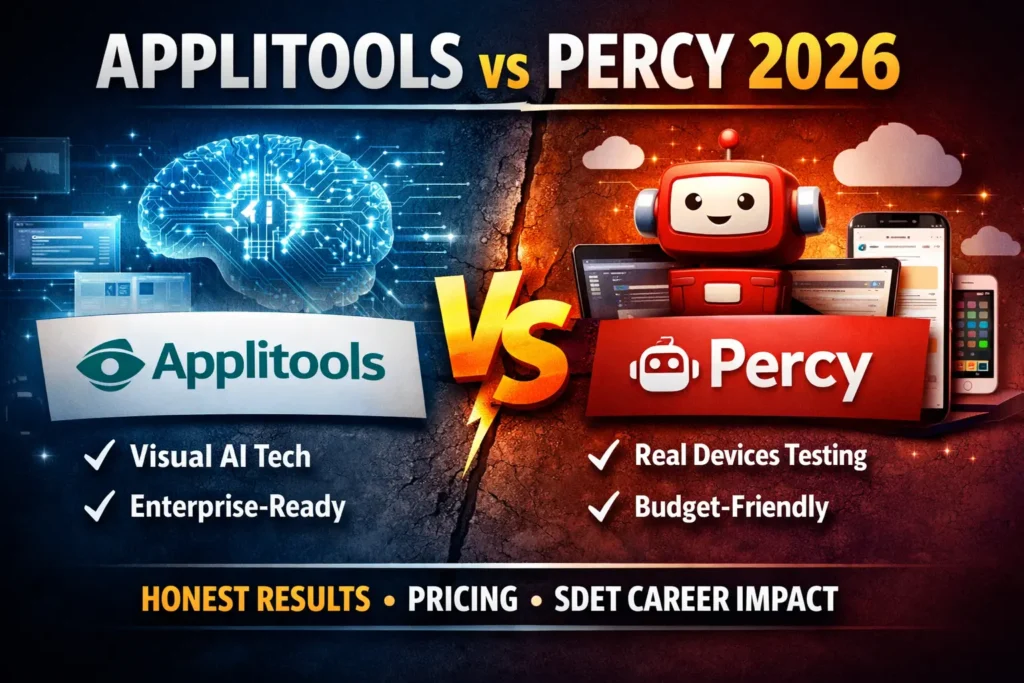
The Applitools vs Percy debate in 2026 is not about which tool takes better screenshots. It is about which approach to visual testing fits your team size, budget, career goals, and tolerance for false positives.
I have studied both tools in depth, analysed real SDET job postings, and tested how each one fits into modern CI/CD pipelines. This guide gives you the honest answer — not vendor marketing, not a feature checklist, but a practical decision framework for automation engineers.
Table of Contents
What Is Visual Testing and Why Does It Matter in 2026?
Before diving into Applitools vs Percy specifically, you need to understand what visual testing actually solves.
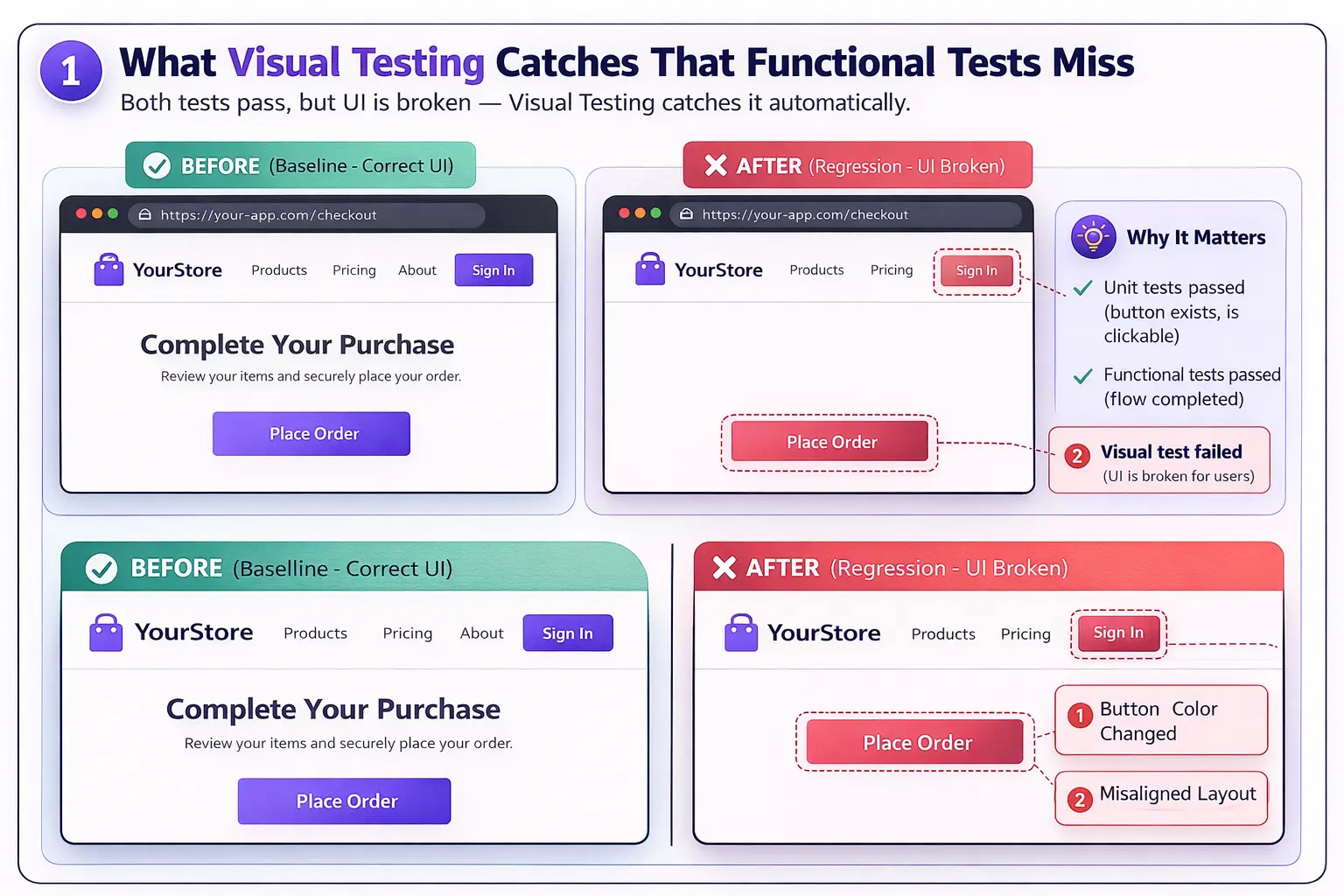
Traditional automation tests whether a button exists and is clickable. Visual testing checks whether the button looks correct — the right colour, size, position, and font. A unit test passes. The UI is broken. Visual testing catches what functional tests miss.
In 2026, this matters more than ever. Frontend frameworks like React and Vue update constantly. A single CSS change can break layouts across dozens of pages without touching a single line of JavaScript. Visual regression testing catches these failures automatically before they reach production.
For the broader context of how visual testing fits your full automation stack, read our best AI testing tools guide.
Applitools vs Percy — Quick Comparison
| Feature | Applitools | Percy |
|---|---|---|
| Visual AI Engine | ✅ Proprietary Visual AI | ✅ AI Review Agent (2026) |
| Rendering Approach | Ultrafast Grid — DOM rerenders in cloud | Real devices via BrowserStack cloud |
| False Positive Rate | Very low — AI filters noise | Moderate — improving with AI triage |
| Free Tier | ✅ Limited — 100 checkpoints/month | ✅ Generous — 5,000 snapshots/month |
| Paid Plans | From $399/month (enterprise) | From $199/month |
| CI/CD Integration | ✅ Excellent | ✅ Excellent |
| Selenium Support | ✅ Yes | ✅ Yes |
| Playwright Support | ✅ Yes | ✅ Yes |
| Cypress Support | ✅ Yes | ✅ Yes |
| Mobile Testing | ✅ Via Appium | ✅ Via BrowserStack real devices |
| Best For | Enterprise teams, FinTech, high accuracy | Startups, freelancers, CI/CD speed |
Pricing is subject to change — always check official websites for current rates.
The Core Difference — Visual AI vs Pixel Diffing
This is the most important technical distinction in the Applitools vs Percy comparison and the one most articles explain incorrectly.
Applitools Visual AI simulates human vision. It ignores sub-pixel rendering differences, anti-aliasing artefacts, and font rendering variations between operating systems. It asks the question — “Would a human notice this change?” If the answer is no, it passes. If yes, it flags it.
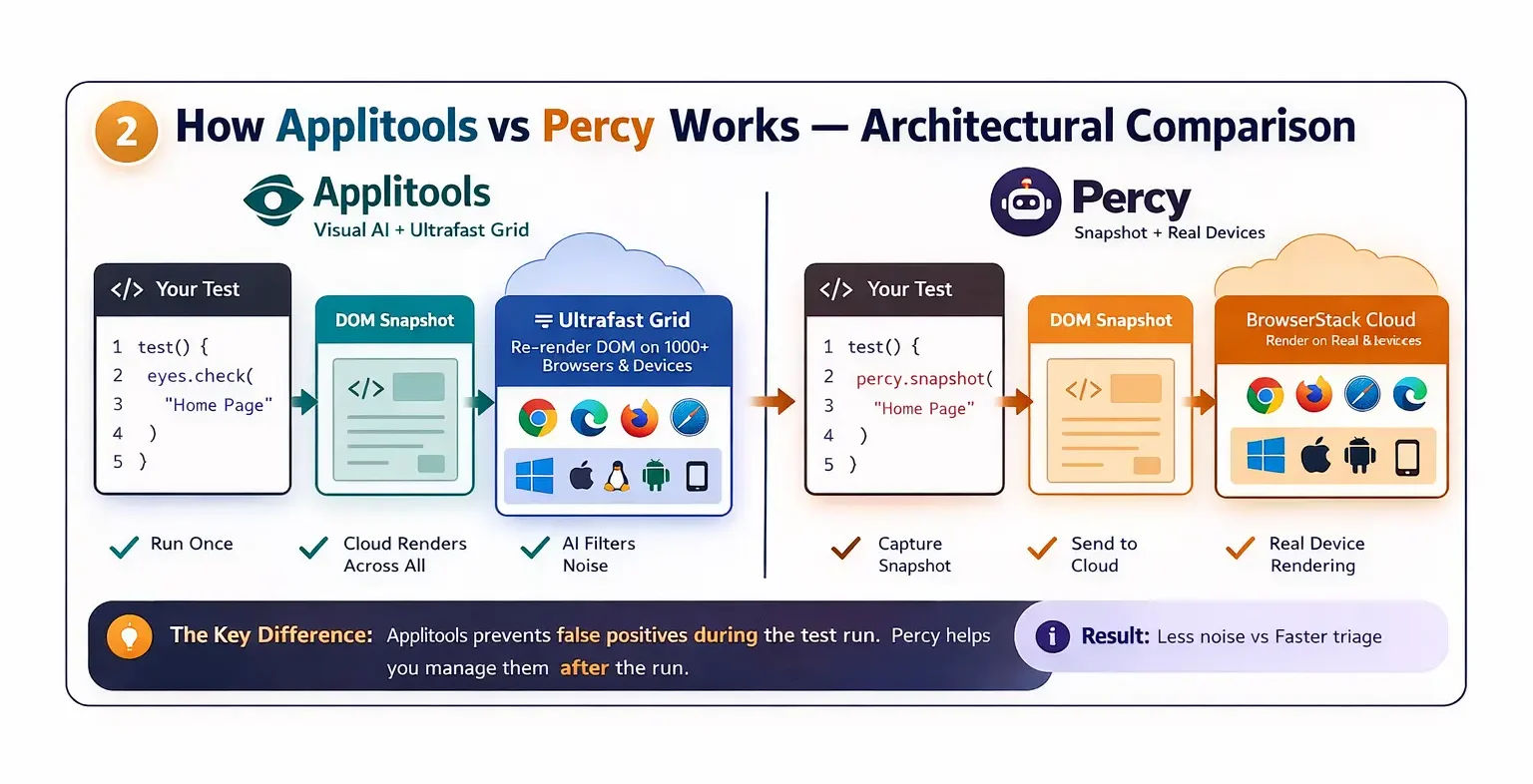
Percy historically used pixel-by-pixel comparison — any pixel difference triggered a failure. This caused massive false positive rates. In 2026, Percy has significantly improved this with its Visual Review Agent — an AI assistant that analyses flagged differences and summarises them in natural language, helping teams triage faster. But the fundamental architecture is different — Applitools prevents false positives during the test run, while Percy helps you manage them after.
The practical impact on Applitools vs Percy for your daily workflow:
- The Applitools team reviews 5 to 10 flagged differences per sprint
- Percy team, without careful configuration reviews, 50 to 100 flagged differences
That difference matters enormously at scale. At 1,000 tests per day, the maintenance time gap between the two tools is measured in engineer-hours per week.
How Applitools Works in 2026
Applitools Eyes is the core visual validation engine. It captures the visual state of your application and compares it against a baseline using Visual AI.
You can explore the official platform on Applitools to understand how Visual AI and Ultrafast Grid work in real-world testing.
The Ultrafast Grid is Applitools’ key 2026 differentiator. Instead of running your tests multiple times across different browsers and devices, you run them once. Applitools re-renders the DOM snapshot in its cloud across every browser configuration simultaneously. A test suite that would take 4 hours running sequentially completes in 8 minutes on the Ultrafast Grid.
Here is a basic Applitools integration with Playwright:
from applitools.playwright import Eyes, Target
from playwright.sync_api import sync_playwright

def test_homepage_visual():
    with sync_playwright() as p:
        browser = p.chromium.launch()
        page = browser.new_page()

        eyes = Eyes()
        eyes.api_key = "YOUR_APPLITOOLS_API_KEY"

        eyes.open(page, "My App", "Homepage Test")
        page.goto("https://your-app.com")

        # Visual checkpoint — Applitools AI evaluates this
        eyes.check("Homepage", Target.window().fully())

        eyes.close()
        browser.close()
Every eyes.check() call creates a visual checkpoint. Applitools compares it against the baseline and flags only changes that a human would actually notice.
How Percy Works in 2026
Percy — now owned by BrowserStack — uses a different architectural approach for the Applitools vs Percy comparison. It captures DOM snapshots during your test run and renders them in its cloud infrastructure using BrowserStack’s real device network.
You can check Percy by BrowserStack to see how real-device rendering and visual testing workflows operate in practice.
The Visual Review Agent — Percy’s major 2026 update — uses an AI assistant to analyse visual differences after your test run and generate natural language summaries. “3 changes detected — 2 are text alignment shifts in the nav bar, 1 is a button colour change in the checkout flow.”
Here is a Percy integration with Playwright:
import percy
from playwright.sync_api import sync_playwright

def test_homepage_visual():
    with sync_playwright() as p:
        browser = p.chromium.launch()
        page = browser.new_page()

        page.goto("https://your-app.com")

        # Percy snapshot — sent to Percy cloud for comparison
        percy.snapshot(page, "Homepage")

        browser.close()
Percy’s setup is simpler than Applitools for basic cases. The percy snapshot command is the entire integration. For teams wanting to get visual testing running quickly, this simplicity is genuinely valuable.
Applitools vs Percy — 7 Key Differences That Matter
1. False Positive Management
Applitools vs Percy on false positives is the most important practical difference.
Applitools Visual AI filters noise during the test run. Dynamic content — timestamps, ads, carousels, user-generated data — gets ignored automatically. The result is a low-noise test suite that teams actually trust.
Percy, without careful baseline management, generates significantly more false positives. The Visual Review Agent helps triage them, but does not prevent them. For teams starting with Percy, expect to invest time in baseline management and ignore region configuration before the noise level becomes manageable.
Winner: Applitools — significantly lower maintenance overhead at scale.
2. Cross-Browser Testing Architecture
This is the architectural difference that most Applitools vs Percy articles miss completely.
Applitools Ultrafast Grid re-renders your DOM snapshot in the cloud across every browser configuration. Your test runs once. Applitools handles the cross-browser rendering. Extremely fast — a 1,000-checkpoint suite across 10 browser configurations completes in minutes.
Percy sends your snapshots to the BrowserStack real device cloud. Rendering happens on actual browsers and devices. Slightly slower but environmentally authentic — what you see in Percy is exactly what a real user on that device would see.
Winner: Depends on your need — Applitools for speed, Percy for environmental accuracy.
3. Pricing Reality
Applitools vs Percy on pricing is where vendor blogs mislead most.
Applitools enterprise pricing starts around $399 to $969 per month, depending on checkpoint volume and team size. However — and this is the insider knowledge no vendor blog shares — Applitools regularly offers 20 to 40% discounts to teams who mention they are evaluating Percy. If you are in procurement discussions, always reference Percy as your alternative before signing.
Percy starts at $199/month with a genuinely generous free tier of 5,000 snapshots per month. For individual SDETs and small teams, Percy’s free tier is legitimately useful for real projects — not just demos.
Winner: Percy for startups and freelancers. Applitools for enterprises where maintenance ROI justifies premium pricing.
4. CI/CD Pipeline Integration
Both tools integrate excellently with GitHub Actions, GitLab CI, Jenkins, and Azure DevOps. This is one area where Applitools vs Percy is genuinely close.
Percy has a slight edge on setup simplicity. The Percy CLI integration requires one command and a PERCY_TOKEN environment variable. Most teams are running visual tests in their pipeline within 30 minutes.
Applitools setup requires slightly more configuration but offers more granular pipeline control — specific batch configurations, branch management, and baseline policies that matter for large teams.
Winner: Percy for quick setup. Applitools for complex enterprise pipeline requirements.
5. Mobile and App Testing
Applitools vs Percy for mobile testing diverges significantly.
Applitools supports native mobile app testing via Appium integration. You can run visual checks on iOS and Android native applications — not just mobile web.
Percy focuses primarily on web testing. Mobile support is via BrowserStack’s responsive web testing — excellent for mobile web but not for native app visual validation.
Winner: Applitools for teams testing native mobile applications. Percy for mobile web responsive testing.
6. Career Value for SDETs
This section is completely absent from every other Applitools vs Percy article.
Applitools appears in SDET job postings primarily at enterprise companies — FinTech, banking, healthcare, and large e-commerce. Applitools certification and experience signal enterprise-grade visual testing knowledge. For SDETs targeting $115K to $150K enterprise roles, Applitools experience is a genuine differentiator.
Percy signals strong CI/CD integration skills and BrowserStack ecosystem knowledge. It appears more frequently in startup and mid-size tech company job postings. For freelance SDETs, Percy’s generous free tier makes it ideal for client work — you can deliver visual testing coverage without a tool budget and upgrade only when the project justifies it.
Winner: Applitools for the enterprise career path. Percy for freelance and startup positioning.
7. The Hidden Cost of False Positives
No Applitools vs Percy comparison covers this honestly. Let us do the maths.
If your team reviews 50 false positives per week at 5 minutes each — that is 250 minutes or 4 hours of engineering time wasted weekly. At a conservative $50 per hour SDET rate, that is $200 per week or $800 per month.
Applitools at $399/month with near-zero false positives actually costs less than Percy at $199/month with $800/month in hidden maintenance time. The tool that looks cheaper is often the more expensive choice.
This calculation changes at a small scale. For a 100-test suite, Percy’s false positive volume is manageable, and the price difference is the dominant factor. At 1,000+ tests, Applitools ROI becomes clear.
Applitools vs Percy — Which Should You Learn First?
If you are building your first visual testing portfolio project: Start with Percy. The free tier gives you 5,000 snapshots to work with. Setup is fast. You have a working visual testing project in your GitHub portfolio within a day. Add this to your SDET resume immediately — our SDET resume guide covers exactly how to present this.
If you are targeting enterprise SDET roles: Learn Applitools. It appears more frequently in enterprise job postings, and the Ultrafast Grid knowledge is a genuine differentiator in interviews. Combine it with your existing Selenium or Playwright skills from our Selenium vs Playwright comparison.
If you are a freelance SDET: Percy first — the free tier means zero overhead cost for client projects. Once clients see the value, upgrading to a paid plan becomes a client expense, not yours.
If you are building a full-stack visual testing skill: Learn both. Percy for quick client work and portfolio projects. Applitools for enterprise client retainers where accuracy and low maintenance matter most.
For the complete visual testing context within your overall automation architecture, read our best Selenium frameworks guide.
Disclosure: This article contains affiliate links. If you purchase through these links, I earn a small commission at no extra cost to you.
To build the Selenium and Playwright foundation needed for either tool integration, the Selenium Python Automation course on Udemy is rated 4.6 stars and covers the framework design skills that both Applitools and Percy build on top of.
Final Thoughts
The Applitools vs Percy decision in 2026 comes down to one question — what is your tolerance for false positive maintenance?
If you are at an enterprise with 1,000+ visual checkpoints running daily, and engineering time is expensive — Applitools pays for itself. The Ultrafast Grid, Visual AI noise filtering, and low maintenance overhead justify the premium.
If you are a freelancer, startup engineer, or SDET building your first visual testing skills — Percy’s free tier and simple setup make it the obvious starting point. The Visual Review Agent genuinely helps with triage, and the BrowserStack integration is seamless.
The honest answer is that most professional SDETs should know both tools. Percy for speed and accessibility. Applitools for accuracy and scale. Together, they represent the complete picture of visual testing in 2026.
For your next steps in building a complete AI testing portfolio, read our how to test LLM applications guide and our QA to SDET transition guide to see how visual testing fits the broader full-stack quality engineering skill set.
Frequently Asked Questions
What is the difference between Applitools and Percy in 2026?
Applitools uses proprietary Visual AI to simulate human vision and filter noise during test runs — resulting in very low false positive rates. Percy uses DOM snapshot rendering in the BrowserStack cloud with an AI Review Agent to help triage differences after the fact. Applitools prioritises accuracy and low maintenance. Percy prioritises speed, simplicity, and accessibility.
Is Applitools better than Percy for visual regression testing?
For enterprise teams with large test suites, yes — Applitools’ Visual AI produces significantly fewer false positives, reducing maintenance time substantially. For small teams and individual SDETs, Percy’s generous free tier and simpler setup make it the more practical choice. The right answer depends on your scale and budget.
How does Percy compare to Applitools in CI/CD pipelines?
Both integrate excellently with GitHub Actions, Jenkins, GitLab CI, and Azure DevOps. Percy has simpler initial setup — one CLI command and an environment variable. Applitools offers more granular pipeline control for enterprise requirements. Both can block deployments automatically when visual regressions are detected.
What are the pricing differences between Applitools and Percy in 2026?
Percy starts at $199/month with a free tier of 5,000 snapshots/month. Applitools enterprise pricing starts around $399 to $969/month, depending on volume. Importantly, Applitools regularly offers 20 to 40% discounts when buyers mention they are evaluating Percy. Always negotiate before signing an Applitools contract.
How do I integrate Applitools or Percy with Selenium or Cypress?
Both have official SDKs for Selenium, Playwright, and Cypress. Applitools requires the Eyes SDK and API key configuration. Percy requires the Percy CLI and a PERCY_TOKEN environment variable. Both integrate in under an hour for basic setups. Code examples for both are included in this article.
Which tool is more accurate for detecting visual bugs?
Applitools is more accurate for filtering false positives — its Visual AI ignores sub-pixel rendering differences and dynamic content that would trigger false failures in Percy. Percy with careful ignore region configuration, can achieve comparable accuracy but requires more upfront investment in baseline management.
Is Percy or Applitools better for large-scale enterprise testing?
Applitools is the enterprise standard in 2026. The Ultrafast Grid handles massive parallel cross-browser testing efficiently. The low false positive rate becomes increasingly valuable at enterprise scale, where manual review time is a high cost. Most FinTech and banking SDET teams with serious visual testing requirements choose Applitools.
How does using Applitools vs Percy impact an SDET career?
Applitools experience signals enterprise-grade visual testing knowledge and appears frequently in high-paying FinTech and banking SDET job postings. Percy’s experience signals strong CI/CD integration and BrowserStack ecosystem skills — more common in startup and mid-size tech company postings. For maximum career flexibility, learn both and present them as complementary skills on your resume.