The Postman vs Bruno debate exploded in 2026 for one reason — Postman pushed harder toward cloud-only features and paywalls, and developers started looking for a local-first escape. Bruno is that escape: open-source, Git-native, and offline. But is it actually ready to replace Postman for serious API testing?
This comparison is written for SDETs and automation engineers, not marketers. It covers the real migration cost, the script syntax differences nobody mentions, Bru CLI vs Newman for CI/CD, and a hard recommendation on exactly when to switch and when to stay.
Postman vs Bruno — which is better?
Bruno is better for teams that want a lightweight, local-first API client with native Git version control and no paywalls, storing collections as plain-text .bru files alongside their code. Postman is better for enterprise teams needing built-in mock servers, cloud collaboration, and a full API lifecycle platform. For SDETs building Git-based CI/CD pipelines, Bruno’s architecture is cleaner; for large teams relying on cloud governance, Postman still leads.
Postman vs Bruno — Key Takeaways
- Architecture: Postman is a cloud-first platform; Bruno is local-first, storing collections as plain-text .bru files on your machine.
- Version control: Bruno works natively with Git (collections live in your repo); Postman uses proprietary cloud-synced workspaces.
- Pricing: Bruno is free and open-source; Postman locks team collaboration and higher run limits behind paid tiers.
- CI/CD: Postman uses the Newman CLI; Bruno uses the Bru CLI — both run collections in pipelines and output JUnit reports.
- Scripting: Postman uses the pm.* API; Bruno uses bru.* — migrating complex scripts is real work, not a one-click import.
- When to switch: switch to Bruno for Git-native workflows and privacy; stay on Postman if you rely on built-in mock servers and cloud governance.
Table of Contents
Why Are Developers Switching From Postman to Bruno?
Developers are switching from Postman to Bruno mainly because of Postman’s push toward cloud-only features, resource bloat, and pricing changes that put team features behind paywalls. Bruno offers a local-first, open-source alternative that addresses all three frustrations.
The three specific triggers behind the migration wave:
- Forced cloud sync — Postman increasingly requires accounts and connectivity for features that used to work locally
- Resource bloat — the Electron-based platform is heavy on RAM and slow to start compared to Bruno’s lightweight client
- Pricing and paywalls — limits on collection runs and team collaboration locked behind paid plans frustrated smaller teams
For SDETs especially, the data privacy angle matters — keeping API collections and secrets on local machines and in your own Git repo, rather than synced to a third-party cloud, is a real compliance advantage. For the broader tool landscape, see our best API testing tools guide.
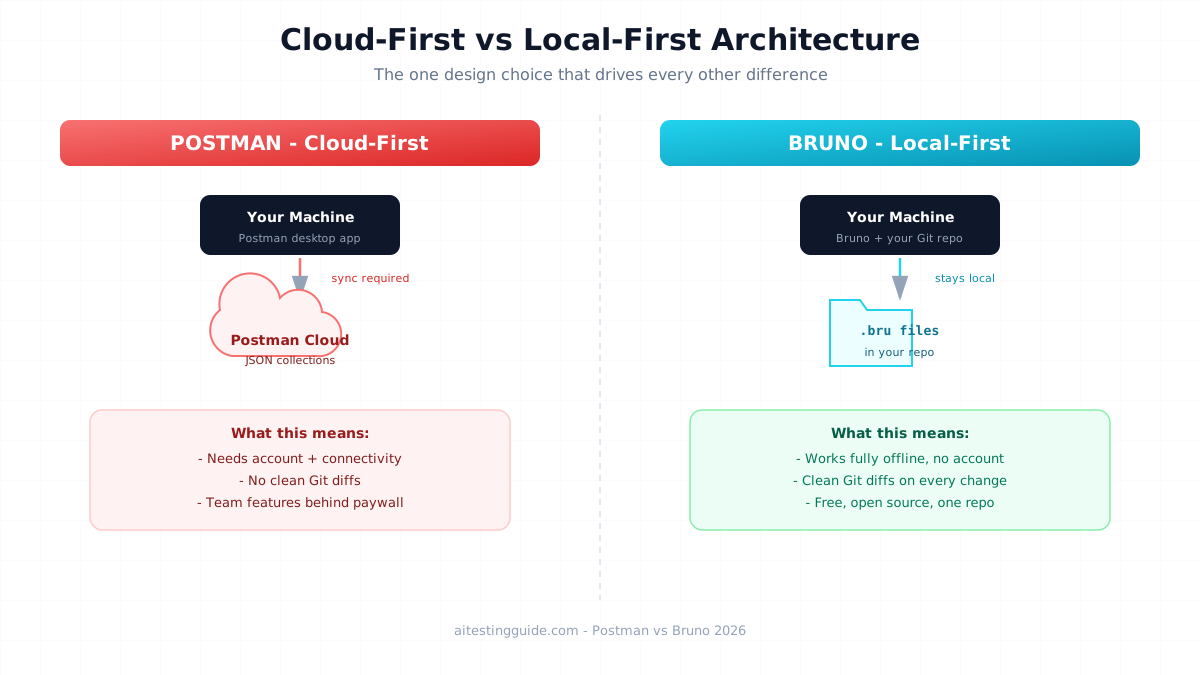
The Architecture Difference — .bru Files vs JSON Collections
The core difference between Postman and Bruno is storage architecture: Bruno saves each API request as a plain-text .bru file on your disk, while Postman stores collections as cloud-synced JSON. This single design choice drives every other difference.
Because .bru files are plain text living in your project folder, they version-control naturally with Git. You see a clean, readable diff when someone changes a request — exactly like reviewing code. Postman’s JSON collections are bulky, sync through Postman’s cloud, and do not produce reviewable diffs in your repository.
For an SDET, this means Bruno collections sit in the same repo as your application code and your Playwright or Selenium tests — one pull request covers backend API tests and frontend UI tests together. See our Selenium vs Playwright comparison for the UI testing side of that stack.
Can You Import Postman Collections Into Bruno?
Yes, Bruno can import Postman collections, but the “easy migration” claim most articles make is misleading. Basic requests import cleanly, but complex pre-request scripts and tests written in Postman’s pm.* syntax do not automatically translate to Bruno’s bru.* syntax.
The honest migration reality: importing the requests themselves is one click. Rewriting your JavaScript assertions and pre-request logic is manual work. Here is a translation reference for the most common patterns:
| Task | Postman (pm.*) | Bruno (bru.*) |
|---|---|---|
| Get response status | pm.response.code | res.getStatus() |
| Get response body | pm.response.json() | res.getBody() |
| Set variable | pm.environment.set() | bru.setEnvVar() |
| Get variable | pm.environment.get() | bru.getEnvVar() |
| Assertion style | pm.test() + chai | declarative assert block |
Budget real time for this if you have hundreds of scripted requests. For a small collection, it is an afternoon; for a large enterprise suite it can be a multi-day project.
How Do You Write API Tests in Bruno vs Postman?
Postman writes tests in JavaScript using pm.test() with the Chai assertion library, while Bruno offers both a declarative assert block and a JavaScript tests block. Bruno’s declarative style is cleaner for simple checks; both support full scripting for complex logic.
Postman test:
pm.test("Status is 200", function () {
    pm.response.to.have.status(200);
});
pm.test("Response has token", function () {
    var json = pm.response.json();
    pm.expect(json.token).to.exist;
});
Bruno equivalent (declarative assert block):
assert {
  res.status: eq 200
  res.body.token: isDefined
}
For SDETs, Bruno’s declarative assertions are faster to read and review in a pull request. Complex logic still drops into a JavaScript tests block when needed.
Bru CLI vs Newman — Which Is Better for CI/CD?
Both Newman (Postman) and the Bru CLI run API collections in CI/CD pipelines, but the Bru CLI is simpler to set up because it runs .bru files already in your repo without needing exported collections or Postman API keys. This is a real workflow advantage for SDETs.
Here is a GitHub Actions workflow running a Bruno collection:
# .github/workflows/api-tests.yml
name: API Tests (Bruno)
on: [push, pull_request]
jobs:
  bruno:
    runs-on: ubuntu-latest
    steps:
      - uses: actions/checkout@v4
      - name: Install Bru CLI
        run: npm install -g @usebruno/cli
      - name: Run Bruno collection
        run: bru run ./api-tests --env ci --reporter-junit results.xml
      - name: Upload results
        if: always()
        uses: actions/upload-artifact@v4
        with:
          name: api-test-results
          path: results.xml
The key difference from Newman: the .bru collection is already checked out with your code, so there is no separate collection export or API key management. For the full pipeline picture, see our GitHub Actions for test automation guide.
Postman vs Bruno — Full Comparison Table
Here is the complete Postman vs Bruno comparison across the factors SDETs weigh when choosing an API client.
| Factor | Postman | Bruno |
|---|---|---|
| Architecture | Cloud-first platform | Local-first client |
| Storage | Cloud-synced JSON | Plain-text .bru files |
| Git integration | Via cloud workspaces | Native |
| Offline use | Limited | Full |
| Open source | No | Yes |
| CLI runner | Newman | Bru CLI |
| Mock servers | Built-in | No native |
| Pricing | Free + paid tiers | Free |
| Resource use | Heavy | Lightweight |
Features and pricing change — always verify current details at postman.com and usebruno.com.
When Should You Stay on Postman?
You should stay on Postman if your team relies heavily on its built-in mock servers, cloud-based collaboration, or enterprise governance features like SSO and role-based access control. Bruno does not natively replace these, and rebuilding them is more work than the migration saves.
Stay on Postman when: you use Postman mock servers in your workflow, your organisation requires centralised cloud governance, your team is non-technical and relies on the GUI-driven collaboration, or you have a massive library of complex pm.* scripts that would cost more to migrate than the benefit returns.
When Should You Switch to Bruno?
You should switch to Bruno if you want Git-native API collections stored alongside your code, prefer a free open-source tool, value data privacy by keeping collections local, or want a lightweight client without cloud dependency. For SDETs building modern CI/CD pipelines, these align perfectly.
Switch to Bruno when: you want one Git repo holding API tests next to your UI automation, your team is technical and comfortable with Git workflows, you are cost-conscious or avoiding vendor lock-in, or data sovereignty matters for compliance. This is increasingly the SDET default in 2026. For the career context, see our AI test engineer roadmap.
Which Should SDETs Learn First for Their Career?
SDETs should learn Postman first because it still appears in far more job postings, then add Bruno as the modern Git-native alternative. Knowing both signals you understand the industry shift and can work in either environment.
The pragmatic career move: Postman is still the incumbent that most job descriptions name, so it is table stakes. But mentioning Bruno and the local-first, Git-native trend in an interview signals you follow where the industry is heading — which differentiates you. Learn Postman for employability, learn Bruno for the edge. To build the automation foundation underneath both, this Selenium WebDriver with Python course on Udemy covers the testing fundamentals that transfer across all tools.
Disclosure: This article contains affiliate links. If you purchase through these links I earn a small commission at no extra cost to you.
Final Thoughts
The Postman vs Bruno decision comes down to architecture and workflow, not a simple winner. Bruno wins for SDETs who want Git-native, local-first, open-source API testing that lives in the same repo as their code. Postman wins for teams that depend on its mock servers, cloud collaboration, and enterprise governance.
Do not believe the one-click migration myth — moving complex scripts from pm.* to bru.* is real work. But for new projects and Git-centric teams, Bruno is the cleaner modern choice. Learn Postman for the job market, adopt Bruno for the workflow, and you are covered either way in 2026.
Frequently Asked Questions
Which is better for API testing in 2026: Postman or Bruno?
Bruno is better for SDETs wanting lightweight, Git-native, local-first API testing that lives in their code repo, while Postman is better for teams needing mock servers, cloud collaboration, and enterprise governance. For modern CI/CD pipelines Bruno’s architecture is cleaner; for large non-technical teams Postman’s platform features still lead.
Why are QA engineers switching from Postman to Bruno in 2026?
QA engineers are switching because of Postman’s push to cloud-only features, its heavy resource usage, and pricing changes that lock team features behind paywalls. Bruno solves all three with a free, open-source, local-first client that stores collections as plain-text .bru files version-controlled natively with Git.
Is Bruno better than Postman for Git-based workflows?
Yes, Bruno is better for Git-based workflows because it stores each request as a plain-text .bru file in your project folder, producing clean reviewable diffs in pull requests. Postman uses cloud-synced JSON collections that do not version-control naturally in your repository, making Bruno the clear choice for Git-centric teams.
What is the switching cost from Postman to Bruno for teams?
The main switching cost is rewriting scripts. Basic requests import into Bruno in one click, but complex pre-request scripts and tests in Postman’s pm.* syntax must be manually translated to Bruno’s bru.* syntax. A small collection takes an afternoon; a large enterprise suite with hundreds of scripted requests can take several days.
Does Bruno support CI/CD pipelines like Postman in 2026?
Yes, Bruno supports CI/CD through the Bru CLI, which runs .bru collections in pipelines and outputs JUnit XML reports. It is often simpler than Postman’s Newman because the collection is already in your repo, removing the need for collection exports or Postman API keys. Both integrate with GitHub Actions, GitLab CI, and Jenkins.
Which tool is cheaper for API testing teams: Postman or Bruno?
Bruno is cheaper because it is completely free and open-source with no paywalls on collaboration or collection runs. Postman offers a free tier but locks team workspaces, higher run limits, and advanced features behind paid plans. For cost-conscious teams or those avoiding vendor lock-in, Bruno has a clear pricing advantage.
Can Bruno fully replace Postman for enterprise QA teams?
Not fully — Bruno lacks native mock servers and the cloud governance features like SSO and role-based access control that large enterprises depend on. For technical teams using Git workflows Bruno is an excellent replacement, but enterprises relying on Postman’s platform features should evaluate carefully before fully migrating.
How do Postman and Bruno compare for team collaboration and shared collections?
Postman offers built-in cloud workspaces for real-time collaboration, ideal for non-technical teams. Bruno takes a “bring your own version control” approach — collections are shared through Git like any code. Technical teams prefer Bruno’s Git model; teams wanting GUI-driven cloud collaboration without Git prefer Postman.
Which is easier to learn first for an SDET career: Postman or Bruno?
Postman is easier to learn first and appears in more job postings, making it the practical starting point. Bruno is also easy, especially for those comfortable with Git. Learn Postman for employability since most job descriptions name it, then add Bruno to show you follow the industry’s shift toward local-first, Git-native tooling.
Should automation testers learn Bruno or Postman in 2026 for better job opportunities?
Automation testers should learn both, starting with Postman because it dominates job postings, then adding Bruno as the modern alternative. Knowing Postman covers the employability baseline, while Bruno knowledge differentiates you by showing awareness of the Git-native, local-first trend that forward-looking engineering teams are adopting in 2026.