
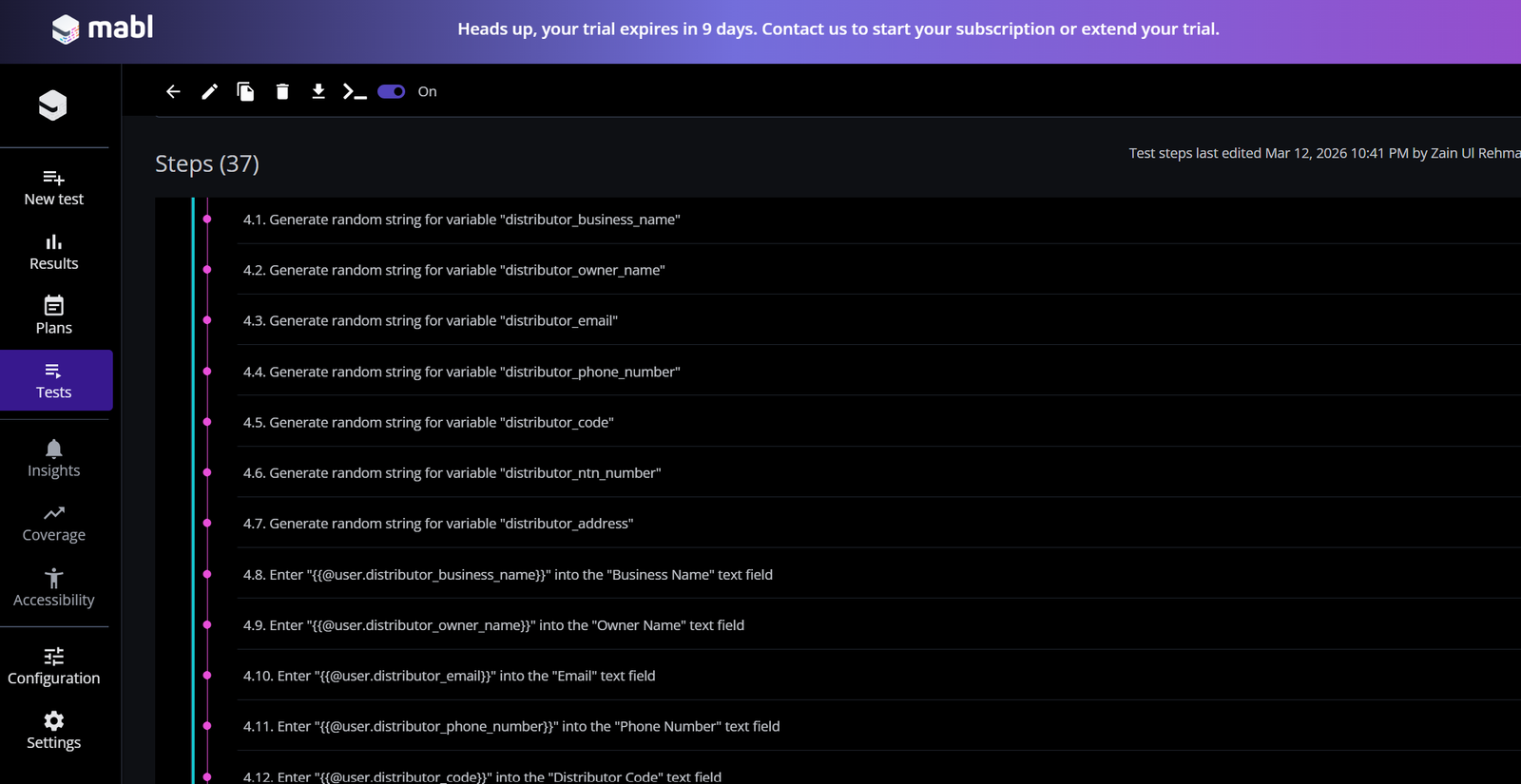
This Mabl review is based on two weeks of hands-on testing. I signed up for the 14-day free trial, completed the guided walkthrough, and built a real automated test with 37 steps on a live staging environment. This is not a review based on marketing materials — it is based on actual hands-on experience.
The short version: Mabl is genuinely impressive for what it does, but it is not the right tool for everyone. Let me explain exactly who should use it and who should not.
Table of Contents
What Is Mabl — Is This Review For You?
Mabl is an AI-powered test automation platform designed for QA engineers and SDETs who want to write fewer lines of code while maintaining comprehensive test coverage. It uses machine learning to create, execute, and maintain automated tests across web applications.
Unlike traditional automation tools like Selenium, where you write every line of code manually, Mabl records your interactions with a browser and converts them into automated tests automatically. It then uses AI to keep those tests working even when the application changes — a feature called auto-healing.
Mabl was founded in 2017 and has become one of the most well-known AI testing tools in the enterprise market. It competes directly with Testim, Applitools, and traditional Selenium-based frameworks. This Mabl review covers everything you need to know before signing up for a trial.
What I Tested — My Hands-On Experience
During this Mabl review, I did not just click through the demo. When I signed up for the Mabl trial, I did not just click through the demo. I set up a real test scenario on a staging environment and built a 37-step automated test for an “Add Distributor Form Functionality” workflow.
Here is what I did during the trial:
- Completed the full guided walkthrough that Mabl provides for new users
- Created a browser-based test using the Mabl trainer desktop app
- Built a 37-step test covering form interactions, field validation, and submission confirmation
- Explored the Results dashboard to understand pass and fail reporting
- Reviewed the Plans section to understand how tests are organized and scheduled
- Explored the Configuration section to understand environment and integration settings
This gave me a realistic picture of what Mabl feels like to use day to day — not just what it looks like in a demo video.
Mabl Key Features
AI-Powered Test Recording
Mabl uses a desktop app called the Mabl Trainer to record your interactions. You open the trainer, navigate through your application, and Mabl records every click, input, and assertion automatically.
The recording experience is smooth. The trainer highlights elements as you interact with them and lets you add assertions at any point — for example, verifying that a confirmation message appears after a form submission.
What impressed me was how clean the recorded steps looked. Each step was clearly labeled and easy to read, which makes maintenance much easier than reading raw XPath selectors in a Selenium script.
Auto-Healing
This is Mabl’s flagship feature and the one that gets the most attention in marketing materials. Auto-healing means that when your application changes — a button moves, a class name changes, an ID gets updated — Mabl automatically detects the change and updates the test to match.
In practice, auto-healing works well for minor UI changes. It will not save you from major application redesigns but it significantly reduces the time spent maintaining tests after routine development changes. This is a genuine time saver for teams that deploy frequently.
Cross-Browser Testing
Mabl runs tests across Chrome, Firefox, Safari, and Edge without requiring you to set up separate browser drivers or maintain a Selenium Grid. You select which browsers to run against when you create a test plan, and Mabl handles the infrastructure.
For teams that need consistent cross-browser coverage without the overhead of managing a browser grid, this is a significant advantage.
Data-Driven Testing
Mabl supports data-driven testing through variables and datasets. You can define test data at the plan level and run the same test with multiple data sets — for example, testing a login form with ten different usernames and password combinations.
I explored this feature during my trial and found it reasonably straightforward to set up once you understand how Mabl organizes variables.
CI/CD Integration
Mabl integrates with GitHub Actions, Jenkins, CircleCI, and most major CI/CD platforms. You can trigger test runs automatically on every code push or as part of your deployment pipeline.
This makes Mabl a credible option for teams that have already invested in continuous delivery and want their tests to run as part of that pipeline.
Results and Reporting
The Results dashboard in Mabl is one of its strongest features. Every test run shows a clear pass or fail status, a timeline of each step, screenshots at every stage, and a detailed log of what happened. When a test fails, the dashboard shows you exactly which step failed and why.
For QA engineers who need to communicate test results to stakeholders, the Mabl reporting dashboard is clean, professional, and easy to share.
What I Liked About Mabl — Review Highlights
Low code barrier to entry. You do not need to be a strong programmer to start creating tests in Mabl. The recording approach means a QA engineer with basic technical skills can build meaningful automated tests within hours of signing up.
Clean and intuitive UI. The Mabl interface is well designed. Navigation between Tests, Plans, Results, and Configuration is logical and consistent. I did not feel lost at any point during my trial, even as a first-time user.
Genuine AI value. The auto-healing feature is not just marketing — it works. For teams that deal with frequent UI changes, auto-healing genuinely reduces maintenance overhead.
Fast test creation. Building my 37-step test took significantly less time than writing the equivalent Selenium script would have. For teams under pressure to build coverage quickly, this speed advantage is real.
Professional reporting. The results dashboard is better than most open source alternatives. Screenshots, step timelines, and failure details are all presented clearly without requiring any additional reporting plugin or setup.
What I Did Not Like About Mabl
Pricing is not transparent. Mabl does not publish its pricing publicly. You have to request a quote, which means the first step toward buying Mabl involves a sales conversation. For individual testers or small teams trying to evaluate cost, this is frustrating.
Enterprise-focused. Mabl is clearly built for teams, not individuals. The platform makes most sense when multiple testers are collaborating, running parallel test suites, and integrating with a full CI/CD pipeline. Solo QA engineers or freelancers will find it hard to justify the cost.
Learning curve for advanced features. The basics are easy to pick up, but advanced features like data-driven testing, environment configuration, and CI/CD integration require meaningful time investment to set up correctly. The documentation is good, but not always beginner-friendly.
Limited offline capability. Mabl is a cloud-based platform. Everything runs in the cloud, which means you need a stable internet connection to use it effectively. Teams with strict data privacy requirements may find the cloud-only approach a limitation.
Mabl Pricing
Mabl does not publish its pricing publicly. All plans require you to request a quote directly from their sales team at mabl.com/pricing.
Based on publicly available information and community discussions, Mabl is positioned as an enterprise tool with pricing that reflects that positioning. A 14-day free trial is available without requiring a credit card, which is the best way to evaluate the platform before any sales conversation.
Pricing is subject to change — always check mabl.com for current information.
Who Should Use Mabl — Review Recommendations
Mabl is a good fit if:
- You are on a QA team of 3 or more people
- Your application deploys frequently, and UI changes regularly
- You need cross-browser coverage without managing infrastructure
- Your team has a budget for enterprise tooling
- You want to reduce test maintenance time
- You are evaluating AI testing tools for a mid-size or large company
Mabl is not a good fit if:
- You are a solo freelancer or independent QA engineer
- You are on a tight budget or a startup with limited tooling spend
- You need a tool you can evaluate fully without a sales conversation
- You are a beginner just learning test automation — Selenium is a better starting point
- You need an on-premise deployment for data privacy reasons
Mabl vs Alternatives
One of the most common questions in this Mabl review is how it compares to free alternatives like Selenium and Katalon.
| Feature | Mabl | Selenium | Testim | Katalon |
|---|---|---|---|---|
| AI auto-healing | ✅ Yes | ❌ No | ✅ Yes | ✅ Partial |
| Low code recording | ✅ Yes | ❌ No | ✅ Yes | ✅ Yes |
| Open source | ❌ No | ✅ Yes | ❌ No | ✅ Partial |
| Free tier | ❌ Trial only | ✅ Yes | ❌ Trial only | ✅ Yes |
| CI/CD integration | ✅ Yes | ✅ Yes | ✅ Yes | ✅ Yes |
| Cross-browser | ✅ Built in | ⚠️ Manual setup | ✅ Yes | ✅ Yes |
| Pricing transparency | ❌ No | ✅ Free | ❌ No | ✅ Yes |
| Best for | Teams | SDETs | Teams | All levels |
For a full comparison of all the top AI testing tools, including Mabl, Testim, BrowserStack, and more, read my complete guide to the best AI testing tools for QA engineers in 2026.
Final Verdict
To summarize this Mabl review in one sentence — it is one of the most polished AI testing platforms available in 2026, but it is built for teams, not individuals. Mabl is one of the most polished AI testing platforms available in 2026. The auto-healing feature works, the UI is clean, test creation is fast, and the reporting dashboard is genuinely useful.
But it is an enterprise tool with enterprise pricing and enterprise complexity. If you are a solo tester, a freelancer, or a beginner — Mabl is probably not where you should start. Start with Selenium to build your fundamentals, then evaluate Mabl when you are working in a team context with a real budget.
If you are evaluating AI testing tools for your team, the 14-day free trial is worth taking seriously. Build a real test on your actual application — not just the demo — and you will get a clear picture of whether Mabl fits your workflow.
Overall rating: 4 out of 5
Strong platform with real AI value. Loses one point for pricing opacity and enterprise-only positioning.
Mabl Review — Frequently Asked Questions
Is Mabl worth it in 2026 — honest review verdict?
Based on my hands-on Mabl review, it is worth it for teams of 3 or more with a dedicated testing budget. Solo testers and freelancers will find it hard to justify the cost compared to free alternatives.
Does Mabl require coding skills?
No — Mabl is designed to be low code. You can create and maintain tests without writing code using the visual recorder. However, basic technical understanding helps when setting up CI/CD integration and data-driven testing.
How does Mabl auto-healing work?
Mabl uses machine learning to track UI elements across multiple attributes — not just a single ID or class name. When an element changes, Mabl automatically identifies the new element and updates the test without manual intervention.
Is there a free version of Mabl?
Mabl offers a 14-day free trial without requiring a credit card. There is no permanent free tier — after the trial, you need a paid plan.
How does Mabl compare to Selenium?
Selenium is a free, open-source framework that requires programming skills. Mabl is a paid platform with AI features that requires minimal coding. SDETs often use both — Selenium for custom framework work and Mabl for rapid test creation and maintenance in team environments. Read my full comparison of the best AI testing tools for QA engineers for more details.