
GitHub Copilot for test automation is the most practical AI tool QA engineers can add to their workflow in 2026 — and most tutorials either oversell it or explain it so vaguely that you cannot actually use it.
This guide gives you the honest picture: what GitHub Copilot for test automation genuinely accelerates, where it fails, and exactly which prompts produce reliable Selenium and Playwright test code that actually runs.
What is GitHub Copilot for test automation? GitHub Copilot for test automation is an AI pair programmer built into VS Code and IntelliJ that generates test code in real time as you type. It uses OpenAI Codex to suggest Page Object classes, test methods, data providers, and BDD step definitions based on your existing framework context. It costs $10/month for individuals and generates boilerplate test code 60–70% faster than manual writing.
Table of Contents
What GitHub Copilot for Test Automation Actually Does
GitHub Copilot for test automation works as an AI pair programmer inside your IDE. It reads your existing code context — open files, imports, class names, method signatures — and suggests completions as you type.
For test automation specifically, Copilot excels at four tasks:
1. Page Object Model boilerplate — generating page classes with locators and action methods from a short comment describing the page
2. Test method generation — completing test methods based on the method name and class context
3. Synthetic test data — generating JSON, CSV, and TestNG DataProvider arrays for data-driven testing
4. Code refactoring — rewriting legacy test scripts with explicit waits, updated locators, and better error handling
Over 60% of automation engineers using Copilot in 2026 report it has permanently changed how they write boilerplate code. The speed gain on repetitive setup code is real and immediate.
Setting Up GitHub Copilot for Test Automation
Step 1 — Install the extension
In VS Code: Extensions → search “GitHub Copilot” → Install
In IntelliJ IDEA: Plugins → Marketplace → search “GitHub Copilot” → Install
Step 2 — Sign in with GitHub account
You need a GitHub account. Individual plan costs $10/month. Students get it free via GitHub Education.
Step 3 — Open your test project
This is critical and most tutorials skip it. Copilot uses your open files as context. For best results with GitHub Copilot for test automation:
- Open your base page class file
- Open your test configuration file
- Open the page file you are working on
When Copilot sees your BasePage class, it generates page objects that extend it correctly. When it sees your existing test patterns, it matches your naming conventions automatically.
Use Case 1 — Generating Page Object Classes
This is where GitHub Copilot for test automation delivers the most immediate value. Writing a complete Page Object class from scratch takes 20–30 minutes manually. Copilot generates it in 60 seconds.
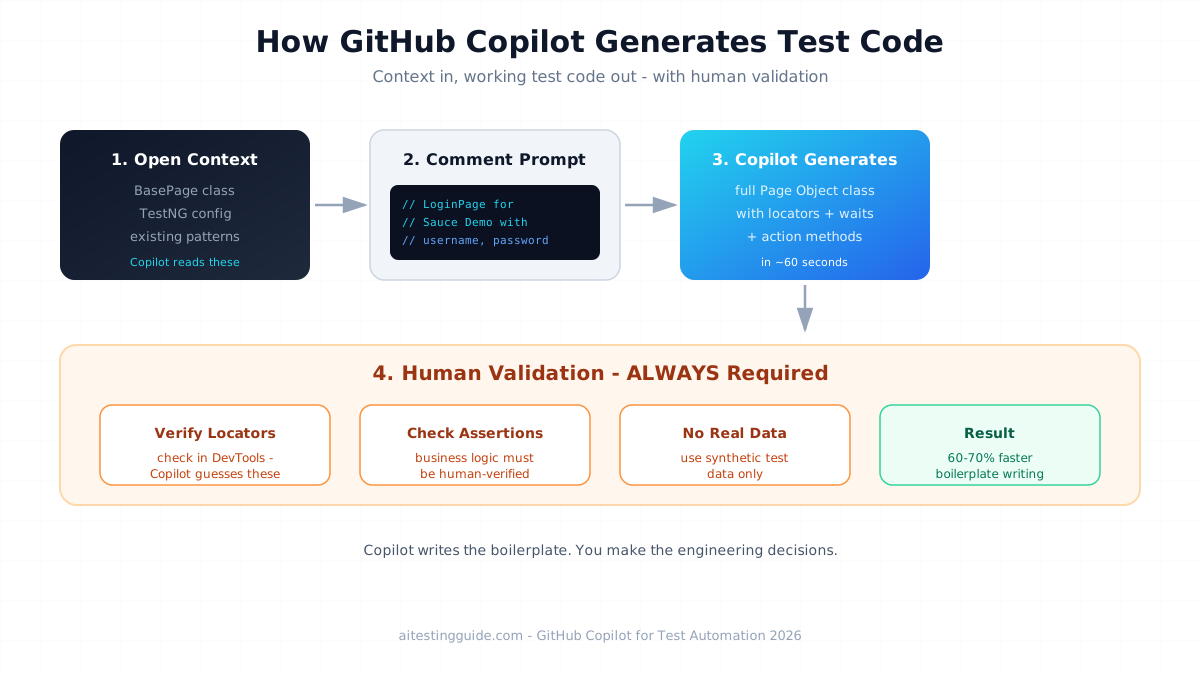
The prompt approach — type this comment in your page file:
// LoginPage for Sauce Demo application
// URL: https://www.saucedemo.com
// Elements: username input, password input, login button, error message
// Actions: login(username, password), getErrorMessage()
After typing this comment and pressing Enter, Copilot suggests the complete class. Here is what it generates:
package pages;

import org.openqa.selenium.By;
import org.openqa.selenium.WebDriver;
import org.openqa.selenium.WebElement;
import org.openqa.selenium.support.ui.ExpectedConditions;
import org.openqa.selenium.support.ui.WebDriverWait;
import java.time.Duration;

public class LoginPage {

    private WebDriver driver;
    private WebDriverWait wait;

    // Locators
    private By usernameField = By.id("user-name");
    private By passwordField = By.id("password");
    private By loginButton = By.id("login-button");
    private By errorMessage = By.cssSelector("[data-test='error']");

    public LoginPage(WebDriver driver) {
        this.driver = driver;
        this.wait = new WebDriverWait(driver, Duration.ofSeconds(10));
    }

    public void login(String username, String password) {
        wait.until(ExpectedConditions.visibilityOfElementLocated(usernameField));
        driver.findElement(usernameField).clear();
        driver.findElement(usernameField).sendKeys(username);
        driver.findElement(passwordField).clear();
        driver.findElement(passwordField).sendKeys(password);
        driver.findElement(loginButton).click();
    }

    public String getErrorMessage() {
        wait.until(ExpectedConditions.visibilityOfElementLocated(errorMessage));
        return driver.findElement(errorMessage).getText();
    }

    public boolean isLoginButtonDisplayed() {
        return driver.findElement(loginButton).isDisplayed();
    }
}
This is production-ready code with explicit waits, proper locator strategy, and clear method names. It took 60 seconds, including reviewing the output.
What to always verify after Copilot generates a page class:
- Locators match your actual application (test them in browser DevTools)
- Wait conditions are appropriate for your app’s load time
- Method names match your team’s naming convention
- Imports are complete and correct
Use Case 2 — Generating TestNG Data Providers
The data-driven testing setup is the most time-consuming part of test case implementation. GitHub Copilot for test automation handles this in under 2 minutes.
Type this comment in your test class:
// TestNG DataProvider for login tests
// Provide: valid credentials, invalid password, empty username,
// empty password, SQL injection attempt, XSS attempt
Copilot generates:
@DataProvider(name = "loginData")
public Object[][] loginTestData() {
    return new Object[][] {
        // Valid credentials
        {"standard_user", "secret_sauce", true, ""},
        // Invalid password
        {"standard_user", "wrong_password", false,
         "Username and password do not match"},
        // Empty username
        {"", "secret_sauce", false,
         "Username is required"},
        // Empty password
        {"standard_user", "", false,
         "Password is required"},
        // SQL injection attempt
        {"' OR '1'='1", "' OR '1'='1", false,
         "Username and password do not match"},
        // XSS attempt
        {"<script>alert('xss')</script>", "secret_sauce", false,
         "Username and password do not match"}
    };
}
Notice that Copilot automatically included SQL injection and XSS test cases based on the security context hint. These are the edge cases manual writers typically skip.
Using the DataProvider in your test:
@Test(dataProvider = "loginData")
public void testLogin(String username, String password,
                      boolean expectedSuccess, String expectedError) {
    LoginPage loginPage = new LoginPage(driver);
    loginPage.login(username, password);

    if (expectedSuccess) {
        Assert.assertTrue(driver.getCurrentUrl().contains("inventory"),
            "Expected successful login but URL is: " + driver.getCurrentUrl());
    } else {
        Assert.assertEquals(loginPage.getErrorMessage(), expectedError,
            "Error message mismatch for user: " + username);
    }
}
Use Case 3 — BDD Step Definition Generation
For teams using Cucumber with Java, GitHub Copilot for test automation eliminates the most tedious part of BDD — mapping Gherkin steps to Java methods.
Your feature file:
Feature: User Login

  Scenario: Successful login with valid credentials
    Given the user is on the login page
    When the user enters username "standard_user" and password "secret_sauce"
    And the user clicks the login button
    Then the user should be redirected to the inventory page
In your step definitions file, type the package and import statements, then type:
// Step definitions for login featureCopilot generates:
package stepdefinitions;

import io.cucumber.java.en.Given;
import io.cucumber.java.en.When;
import io.cucumber.java.en.Then;
import io.cucumber.java.en.And;
import pages.LoginPage;
import org.openqa.selenium.WebDriver;
import org.junit.Assert;

public class LoginStepDefinitions {

    private WebDriver driver;
    private LoginPage loginPage;

    @Given("the user is on the login page")
    public void userIsOnLoginPage() {
        driver.get("https://www.saucedemo.com");
        loginPage = new LoginPage(driver);
    }

    @When("the user enters username {string} and password {string}")
    public void userEntersCredentials(String username, String password) {
        loginPage.login(username, password);
    }

    @And("the user clicks the login button")
    public void userClicksLoginButton() {
        // Login button click is handled inside loginPage.login()
        // This step is already complete
    }

    @Then("the user should be redirected to the inventory page")
    public void userIsRedirectedToInventory() {
        Assert.assertTrue(
            "User not redirected to inventory page",
            driver.getCurrentUrl().contains("inventory")
        );
    }
}
The step definitions match the Gherkin syntax exactly and reference the LoginPage object correctly — because Copilot read your LoginPage file from the open context.
Use Case 4 — Refactoring Legacy Test Scripts
One of the most underused capabilities of GitHub Copilot for test automation is fixing existing broken or flaky tests.
The Copilot Chat approach — open your legacy test and ask:
Review this test class and:
1. Replace Thread.sleep() calls with explicit WebDriverWait
2. Update any deprecated Selenium 3 methods to Selenium 4 syntax
3. Add proper exception handling for StaleElementReferenceException
4. Suggest better locator strategies for any XPath that uses text()
Copilot Chat analyses your entire open file and rewrites the problematic sections. A refactoring task that takes 2 hours manually takes 15 minutes with Copilot.
Real-World Use Case — Building a Portfolio Framework in 4 Hours
Here is exactly how an SDET candidate used GitHub Copilot for test automation to build a complete portfolio project on OrangeHRM.
The target: a full Selenium Java + TestNG + POM framework covering 5 features — login, employee management, leave management, recruitment, and performance review.
Without Copilot: Estimated 3 days (24 working hours) for a junior automation engineer.
With Copilot:
- Hour 1: Base framework setup (pom.xml, BasePage, BaseTest, TestNG config)
- Hour 2: Login, employee, and leave page objects generated
- Hour 3: Test classes for all 5 features with data providers
- Hour 4: GitHub Actions CI/CD workflow + README documentation
Total: 4 hours. 47 test cases. Full CI/CD pipeline.
The key: Copilot wrote the boilerplate. The engineer validated locators, verified business logic, and handled edge cases that required OrangeHRM-specific knowledge.
This is the portfolio project that gets callbacks. It demonstrates framework design, data-driven testing, CI/CD ownership, and AI tool proficiency — four senior SDET skills in one GitHub repository. See our how to become an SDET guide for the complete portfolio strategy.
GitHub Copilot vs ChatGPT for Test Automation
| Feature | GitHub Copilot | ChatGPT |
|---|---|---|
| Where it works | Inside your IDE | Browser / API |
| Context awareness | Reads your open files | Only what you paste |
| Real-time suggestions | ✅ As you type | ❌ Request/response |
| Framework-aware output | ✅ Matches your patterns | ⚠️ Generic output |
| BDD step generation | ✅ Matches existing Gherkin | ✅ Good with full context |
| Cost | $10/month | Free + $20/month Pro |
| Best for | Code generation in IDE | Planning, prompting, architecture |
| Hallucination rate | Medium | Medium |
My recommendation: Use both. Copilot for in-IDE code generation where framework context matters. ChatGPT for test case planning, requirement analysis, and complex prompt engineering before you start coding. They are complementary, not competing tools.
GitHub Copilot Limitations for Test Automation — The Honest Assessment
GitHub Copilot for test automation has real limitations that most guides do not mention.
1. Context window size Copilot only reads files you currently have open. In a large framework with 50+ page objects, it does not know about pages you have not opened. Solution: always open your base classes and the most related page objects before generating new code.
2. Locator hallucinations Copilot generates locators based on patterns and naming conventions — not by reading your actual application. It will confidently suggest By.id("email") for a field that actually uses By.id("user-email"). Always verify every locator in your browser’s DevTools before running tests.
3. Business logic blind spots Copilot does not know your application’s business rules. It generates technically correct code that tests the wrong thing. A login test that does not check the post-login state correctly is a false positive — the test passes, but the feature is broken. Human review of assertions is mandatory.
4. Security risks with test data Never prompt Copilot with real production data, real passwords, or real PII. Copilot sends your code context to GitHub’s servers. Use only synthetic test data — usernames like test_user_01, passwords like TestPass123!, fake email addresses.
5. Flaky test amplification If your existing framework has poor wait strategies, Copilot will replicate those patterns. It learns from your code. Bad patterns in your base class mean bad patterns in every generated test. Fix your framework fundamentals first.
The Career Value — Why SDETs Should Add Copilot to Their CV
Adding GitHub Copilot for test automation to your SDET portfolio in 2026 signals three things to hiring managers:
1. You are current — Copilot proficiency shows you are actively learning and using modern tooling, not stuck on 2020-era workflows.
2. You are productive — Engineers who use AI assistance produce more output per hour. That is a direct business value statement.
3. You understand AI limitations — Mentioning that you validate Copilot output, check locators manually, and review generated assertions demonstrates senior engineering judgment, not blind AI dependence.
In technical interviews, when asked “how do you use AI in your testing workflow?” — describing your Copilot + manual validation process immediately distinguishes you from candidates who say “I use ChatGPT sometimes.”
For freelance automation engineers, Copilot reduces delivery time by 30–50% on standard framework build projects. A pipeline build that charged $1,500 for 3 days of work now takes 1.5 days — you can either deliver faster or take on more projects simultaneously.
Final Thoughts
GitHub Copilot for test automation is a genuine productivity multiplier for SDETs in 2026. It does not replace your framework thinking, your locator judgment, or your understanding of what to test. It removes the tedious parts — the boilerplate, the data providers, the repetitive page class structure — so you focus on the parts that require real engineering decisions.
The engineers who benefit most from GitHub Copilot for test automation are those who already understand Selenium, POM, and CI/CD well enough to validate and correct what Copilot generates. If you are just starting out, build your manual skills first. If you are mid-level or beyond, add Copilot today.
For the broader AI testing toolkit beyond code generation, read our guide on how to write test cases with AI and our GitHub Actions for test automation guide.
To build the Selenium foundation that makes Copilot genuinely useful, this Selenium WebDriver with Python course on Udemy covers everything from locator strategies to full POM framework design.
Disclosure: This article contains affiliate links. If you purchase through these links I earn a small commission at no extra cost to you.
Frequently Asked Questions
How do I use GitHub Copilot for test automation in Selenium?
Install the GitHub Copilot extension in VS Code or IntelliJ IDEA. Open your existing framework files so Copilot reads your patterns. Type descriptive comments above where you want code generated — for example “LoginPage for Sauce Demo with username, password, login button elements.” Copilot suggests the complete Page Object class in real time. Always verify locators in browser DevTools before running tests.
Can GitHub Copilot generate reliable test cases for QA?
Yes, with important caveats. Copilot generates reliable boilerplate code and data-driven test structures 60–70% faster than manual writing. It is not reliable for business logic assertions or application-specific locators without verification. Every Copilot-generated test requires human review of locators, assertions, and expected results before it can be considered production-ready.
Is GitHub Copilot worth it for QA engineers in 2026?
Yes for automation engineers — the $10/month cost pays back within the first hour of use on any real framework project. For manual-only QA engineers, the value is lower until they start building automation skills. SDETs using Copilot report 30–50% faster framework development time on standard projects. The career signalling value alone justifies the cost for engineers building their SDET portfolio.
What are the limitations of GitHub Copilot in automation testing?
The main limitations are: limited context window (only reads open files), locator hallucinations (suggests locators that do not exist in your app), business logic blind spots (does not know your application’s rules), security risk with real production data, and flaky test amplification (replicates poor patterns from your existing code). All Copilot output requires human validation before use in production test suites.
GitHub Copilot vs ChatGPT for test automation — which is better?
They serve different purposes. Copilot is better for in-IDE real-time code generation where framework context matters — it reads your open files and matches your patterns. ChatGPT is better for test case planning, requirement analysis, and generating test cases before you start coding. Using both together is the optimal workflow — ChatGPT for planning, Copilot for implementation.
How much does GitHub Copilot cost for developers and testers?
GitHub Copilot Individual costs $10 per month or $100 per year. GitHub Copilot Business costs $19 per user per month with organisation management features. Students and verified open-source maintainers get free access through GitHub Education. A free 30-day trial is available. At $10/month, it pays back within 1–2 hours of use on any real automation project.
Does GitHub Copilot support frameworks like Cypress or Playwright?
Yes. GitHub Copilot supports all major test automation frameworks — Selenium, Playwright, Cypress, TestNG, JUnit, PyTest, Mocha, and Chai. It generates framework-appropriate code when you have relevant files open. For Playwright, open your existing test files and page objects. For Cypress, open your command files and existing specs. Copilot matches the patterns and syntax of your existing framework automatically.
Can GitHub Copilot replace manual QA or SDET roles?
No. GitHub Copilot generates boilerplate code faster, but cannot make testing decisions. It does not know which scenarios to test, cannot validate business logic, cannot judge UX quality, and cannot design test strategies. It replaces repetitive code writing, not engineering judgment. SDETs using Copilot are more productive — they are not replaced. Manual QA roles focused on execution face more displacement than automation engineers using AI tools.
How do I improve test coverage using GitHub Copilot?
Use descriptive comments to guide Copilot toward coverage areas — “// Generate test cases including boundary values, null inputs, and security injection attempts.” For data-driven coverage, prompt Copilot to generate DataProvider arrays that cover valid, invalid, boundary, and edge case data. Use Copilot Chat to review existing test classes and ask “what scenarios are missing from this test suite?” for gap identification.
How accurate is GitHub Copilot for writing test scripts?
Copilot is highly accurate for structural code — class scaffolding, method signatures, import statements, and common patterns. It is less accurate for application-specific locators (requires verification) and business logic assertions (requires domain knowledge). In a benchmarked framework project on Sauce Demo, Copilot-generated code required locator corrections in 30% of page objects but required no structural changes. Human review time was 15 minutes per hour of Copilot use.